
Build High‑Converting Local Landing Pages on Lovable: Template, URL Structure & Geo Signal Checklist
Learn about lovable local landing pages: what it is, how it works, and the practical steps to apply it on your site.
On this page
- TL;DR
- When to create a local landing page (service area, multi-location, single store)
- URL & site structure best practices for Lovable (folders, subdomains, canonical rules)
- Example URL patterns and pros/cons
- Page template that wins local clicks and AI answers (content blocks and length)
- Hero: concise service + location phrase for snippet matching
- Local proof: reviews, photos, and local signals that increase CTR
- Geo signals to include on the page (schema, visible address, map, structured FAQs)
- Conversion elements optimized for local searchers (click to call, booking, directions)
- Technical checklist for crawlability and indexation on Lovable
- pagination, sitemaps, hreflang (if multi-language), and canonicalization tips
- A/B test ideas and metrics to measure (local clicks, phone calls, map directions)
- Appendix — plug-and-play Lovable landing page template and copy swipes
TL;DR
- Local landing page checklist: URL + H1 with location, LocalBusiness schema, visible NAP, 1–2 local reviews, and CTA (directions/call/booking).
- Create storefront pages for single locations and service-area pages for non-storefront coverage; use city or neighborhood granularity.
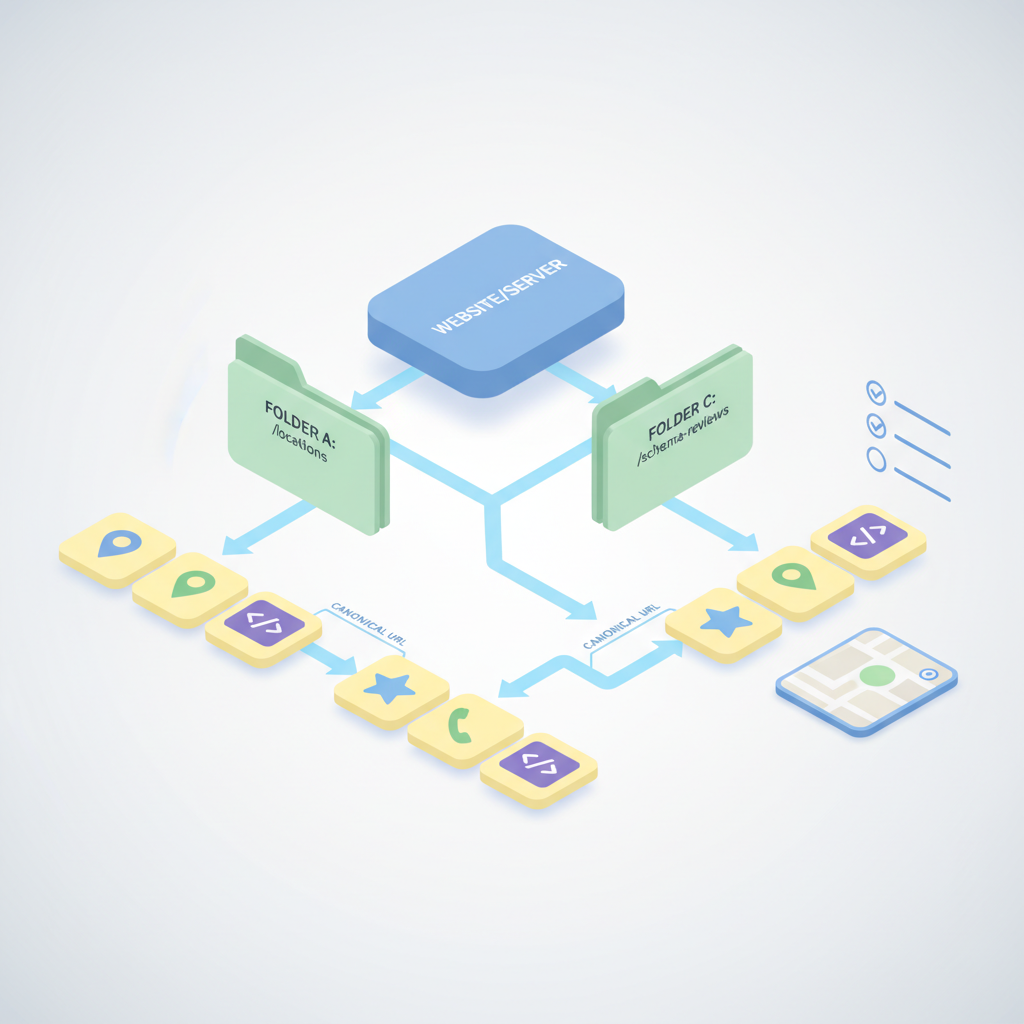
- Prefer folder URLs (/city/service) for crawl efficiency; canonicalize duplicates and expose pages in sitemap.

When to create a local landing page (service area, multi-location, single store)
You may be wasting time and creating thin pages if you spin up local landing pages for every tiny neighborhood without a clear reason. If your business needs local visibility but the strategy is unfocused, search engines will see many low-value pages rather than a smaller set of useful pages. The solution is to match page type to business model: create storefront pages where customers visit a physical address, and create service-area pages where you deliver to neighborhoods without a storefront. This article shows how to do that on Lovable and how to make each page rank and convert.
Quick answer: build a storefront page when you have a public address customers visit; build service-area pages when work is performed at customer locations. Target city or neighborhood granularity, not every block. For multi-location businesses, create a clear page per physical location and a landing page for the broader service area that links to each store page.
Definitions: a storefront page lists a visible address and opening hours; a service-area page lists the areas served without a public storefront. Recommended geo granularity: city-level for most services, neighborhood-level for hyperlocal searches (within ~5–10 mile radius).
When NOT to create a local landing page
- If the page would be duplicate content with only the location name changed.
- If you have no local proof (no address, reviews, or map) to make the page useful.
- If search volume for the neighborhood is negligible and maintenance cost outweighs potential traffic.
Storefront pages must expose NAP and business hours on the page to be considered authoritative by local systems.
URL & site structure best practices for Lovable (folders, subdomains, canonical rules)
How you place local pages on Lovable affects crawlability and ranking. Use a consistent structure and avoid creating multiple equivalent URLs for the same location. Recommended approaches include folder-based URLs and strict canonical rules. Folder URLs are simple: example.com/city/service or example.com/locations/location-name. Subdomains (location.example.com) are technically valid but isolate authority and complicate SSL, analytics, and tracking. For most Lovable sites, folders give the best mix of simplicity and domain authority, which is crucial when considering the technical checklist for local SEO setup.
Canonicalization rules: every local page must have a self-referential canonical tag. If you create a broad service-area page and several store pages that overlap, canonicalize less-detailed duplicates to the most complete page. If you use parameterized URLs for campaigns or booking, use canonical tags to point to the base landing page.
Practical Lovable tip: if your CMS supports location templates, keep a single template and populate structured fields (address, phone, coordinates, hours). That keeps markup consistent and reduces accidental thin pages.
Example URL patterns and pros/cons
Below are common patterns you can use on Lovable, with their trade-offs. Use the one that matches operational needs and developer capacity. Keep URLs human-readable and avoid special characters.
| Pattern | Example | Pros | Cons |
|---|---|---|---|
| Folder per city | /seattle/plumbing | Simple, keeps domain authority centralized | Requires consistent naming conventions |
| Location folder | /locations/seattle-downtown | Good for many stores; easy to list all locations | Extra folder depth for nested categories |
| Subdomain | seattle.example.com | Clear separation per market | Fragments authority; heavier maintenance |
Decision rule: for most businesses start with folder-based URLs; switch to location folders if you have 20+ locations and need a locations index. Use canonical tags and a locations sitemap regardless of pattern.
Page template that wins local clicks and AI answers (content blocks and length)
A repeatable local page template keeps quality high and scales. On Lovable, create a template with structured fields and the following content blocks: hero (service + location), short description (50–80 words), services list, local proof (reviews, photos), map and NAP, FAQ (structured), and clear CTAs. Aim for 300–800 words of unique content per local page: enough for local context, short enough to stay focused. For more on this, see Lovable local seo.
Include one paragraph that mentions nearby landmarks or neighborhoods (e.g., "serving Capitol Hill and First Hill") to help AI systems map queries to the location. Use schema fields when available; otherwise include JSON-LD in the page head for LocalBusiness schema to increase the chance of AI snippets.
Local pages that combine structured schema and at least one local review receive higher click-through rates in many local tests.
Hero: concise service + location phrase for snippet matching
The hero headline should be a concise service + location phrase, e.g., "Emergency plumbing in Seattle" (adjust to your service). Keep it under 10 words with the city or neighborhood early in the headline. That exact phrase should appear in the page H1 and within the first paragraph so search and AI systems can match snippet queries directly.
Quotable: "Use a service + location hero (under 10 words) so snippets match search intent."
Local proof: reviews, photos, and local signals that increase CTR
Local proof builds trust and increases CTR. Include 1–2 highlighted reviews (with reviewer first name and neighborhood if available), recent photos of the storefront or local jobs, and a small badge showing associations or local permits. If Lovable allows review snippets or an aggregated rating field, expose it prominently.
Practical example: show two short quotes under the hero and a 4.7/5 averaged rating. If you can, display a timestamp on reviews to show recency. Local proof increases calls and directions clicks because users see real social confirmation.
Geo signals to include on the page (schema, visible address, map, structured FAQs)
Geo signals tell search engines and AI that your page is local and authoritative. Include LocalBusiness schema (JSON-LD) with address, geo coordinates, telephone, opening hours, and serviceArea if appropriate. Visible NAP (name, address, phone) must be text on the page, not just in an image. Embed a visible interactive map and include a structured FAQ block answering common local questions.
For service-area pages, use the serviceArea property in schema to list cities or postal codes; for storefronts, include the postalAddress and geo coordinates. Use neighborhood or city granularity—avoid overly granular lists that add noise. Quotable: "Service-area pages should use city or postal-level granularity in schema, not every street."
Reference: Google’s guidance on structured data and Schema.org LocalBusiness for correct fields and examples.
Conversion elements optimized for local searchers (click to call, booking, directions)
Local visitors want to act immediately. Put one primary CTA above the fold: click-to-call on mobile, directions link, or a short booking form. Use a simple 3-field appointment form (name, phone, desired time) if you collect leads on the page—anything longer kills conversions.
Also include secondaries: an address with a "Get directions" link that opens maps, a short list of services with estimated starting prices where allowed, and a visible promise (e.g., "Same-day service available") only if verifiable. Track clicks on each CTA as separate events so you can measure phone calls, bookings, and direction clicks independently.
Technical checklist for crawlability and indexation on Lovable
Make sure local pages are discoverable by search engines and not blocked by robots.txt or noindex tags. Expose pages in an XML locations sitemap and include them in your main sitemap index. Ensure mobile rendering matches desktop content and that required structured data is present in the HTML head or server-rendered JSON-LD.
Also validate that canonical tags point to the preferred URL and that paginated or filtered listings use rel="next/prev" where needed. For pages created from templates, verify each page has unique title tags and meta descriptions to avoid duplicate snippets.
pagination, sitemaps, hreflang (if multi-language), and canonicalization tips
Pagination: use clear pagination only for lists; avoid paginating single-location pages. Sitemaps: include each location URL and update when locations change. Hreflang: implement only if you serve multiple languages; map each language version to a unique URL and use hreflang attributes. Canonicalization: canonicalize marketing UTM variants to the clean URL and canonicalize service-area duplicates to the primary store page when the content substantially overlaps.
A/B test ideas and metrics to measure (local clicks, phone calls, map directions)
Run A/B tests on hero phrasing, number of reviews shown, and CTA types. Example tests: hero with "Service in City" vs "Service near Neighborhood"; click-to-call button color A vs B; showing price ranges vs no price. Track these KPIs: organic clicks, CTA clicks (call/booking/directions), call duration (for call-quality signal), and form completions.
Use a minimum sample rule: test until you have at least 200 conversions per variant or 2–4 weeks of traffic for low-volume pages. Also segment by device since local behavior differs on mobile vs desktop.
Appendix — plug-and-play Lovable landing page template and copy swipes
Use this copy blueprint inside Lovable's template fields: Hero H1 (service + location), Short intro (60–80 words), Services bullets (3–6 items), Local proof (2 quotes), Map and NAP block, FAQ (3 questions), CTA button (click-to-call + booking link).
Copy swipe examples (short):
- Hero: "Emergency roofing repair in [City]"
- Intro: "Fast, local roofing repairs in [City]. Same-day estimates and licensed crews—call now."
- CTA: "Call [phone number]" and "Get directions"
FAQ
What is build high-converting local landing pages on lovable? Lovable local landing pages are location-targeted pages built on the Lovable platform that combine local content, structured geo schema, visible NAP, and conversion CTAs to attract and convert local searchers.
How does build high-converting local landing pages on lovable work? The process involves creating a location-appropriate page template on Lovable, populating structured fields (address, hours, coordinates), adding LocalBusiness schema and local proof, optimizing URL structure and canonical tags, and measuring conversions like clicks, calls, and directions.
| Local landing page checklist |
|---|
|
Ready to Rank Your Lovable App?
This article was automatically published using LovableSEO. Get your Lovable website ranking on Google with AI-powered SEO content.
Get Started






