
Winner: Lovable + LovableSEO for new projects.
Lovable wins 7 of 12 categories. WordPress wins 2 (blogging CMS and plugin ecosystem). The rest are ties. For new sites in 2026, Lovable delivers 10× faster development, zero maintenance, better Core Web Vitals, and stronger security out of the box.
Lovable vs WordPress — side by side.
A walkthrough of SEO capabilities on both platforms. When you're ready to automate what the video still does manually on WordPress, move the same playbook into LovableSEO.
Head-to-head, no fluff.
You don't need WordPress as a headless CMS to rank. LovableSEO publishes to your domain, handles schema and sitemaps, and runs the ongoing SEO work so you stay in the Lovable editor for product — not blog plugins.
The WordPress tax.
Every plugin is an attack vector. Every delayed update is a vulnerability window. Lovable sites deployed as static builds have virtually no server-side attack surface.
Each plugin adds page weight, potential conflicts, maintenance. Roughly half of all WordPress issues are plugin conflicts. With Lovable, functionality is in clean version-controlled code.
Fixing the 4.4s LCP requires a stack: WP Rocket, ShortPixel, Cloudflare. Lovable ships fast by default — static builds from a CDN.
$10–50/mo hosting + $100–300/yr plugins + developer time for updates. Lovable is free or $20/mo with zero maintenance.
LovableSEO replaces most of that recurring plugin and content cost with one automation layer built for Lovable-hosted sites.
The CMS Trap: Why Adding WordPress to Lovable Is Backwards
Some developers consider using headless WordPress as a CMS for their Lovable site. Here's why that's old-world thinking.
The Integration Tax
To use WordPress as a headless CMS with Lovable, you'd need to:
- Set up and host a WordPress instance ($10-50/mo)
- Configure the REST API or install WPGraphQL
- Build API integration code in your Lovable project
- Handle authentication between the two systems
- Maintain both platforms independently
- Deal with content preview, draft states, and caching
This is the opposite of why you chose Lovable. You chose it because you can describe what you want and get working code in minutes. Adding WordPress undoes that simplicity.
Three Approaches to Content
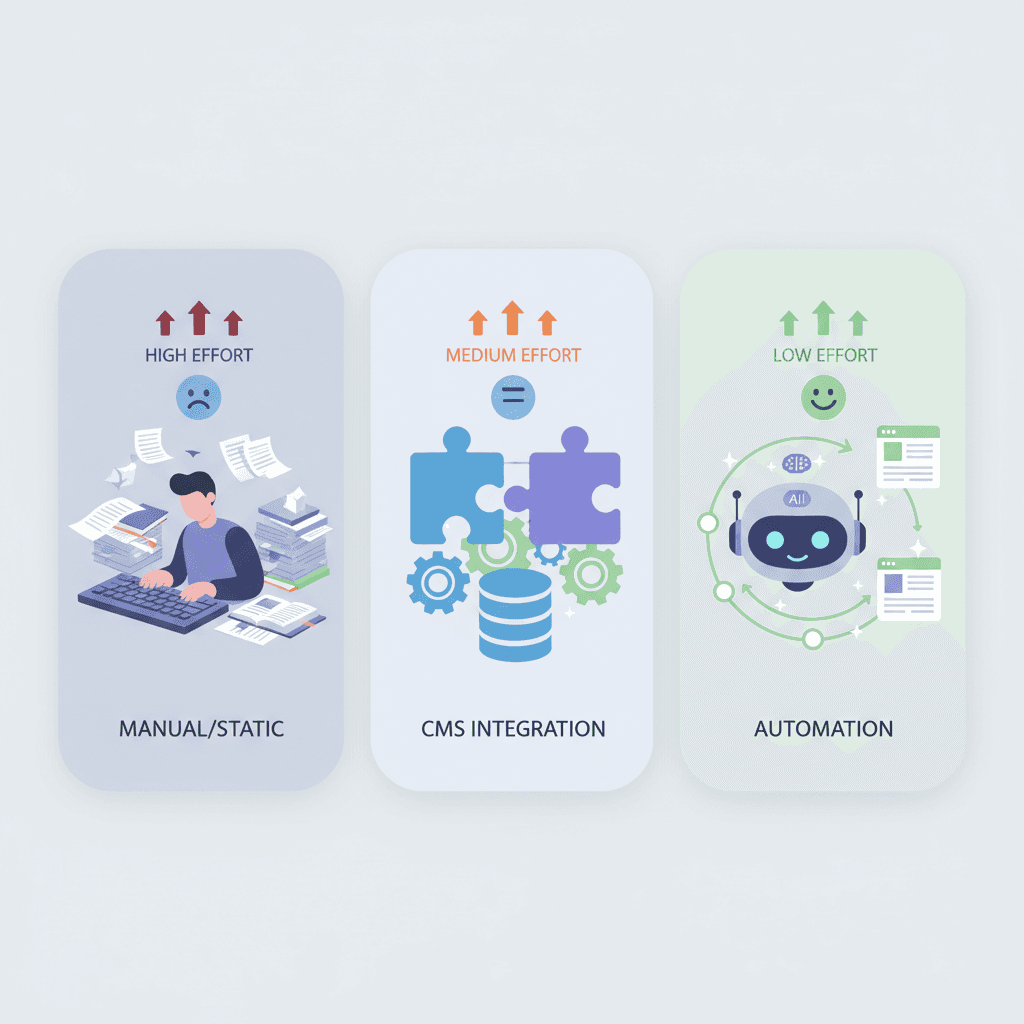
The modern approach: Instead of bolting a CMS onto your Lovable site, let LovableSEO handle content automatically. No integration code, no second platform to maintain, no manual content creation.
The paradigm shift: WordPress was built in 2003 for a world where content meant manually writing blog posts. In 2026, AI agents can research, write, optimize, and publish content automatically. Using WordPress as a CMS is like using a typewriter because it “has all the letters you need.” The capability exists, but the workflow is from a different era.
The Modern Alternative: Lovable + LovableSEO
Instead of adding WordPress complexity, add LovableSEO automation. Get everything WordPress offers for SEO — and more — without the baggage.
Zero Integration Required
LovableSEO works alongside your Lovable site. No API connections, no headless CMS setup, no deployment pipeline changes.
Automated Content Publishing
SEO-optimized articles published automatically based on your keyword strategy. No manual writing, no WordPress editor.
Technical SEO on Autopilot
Schema markup, meta optimization, sitemap generation, and Core Web Vitals monitoring — all handled automatically.
Time Back to Build
No plugin updates, no security patches, no WordPress maintenance. Spend that time building your product instead.

When WordPress Still Makes Sense
We're not going to pretend WordPress is never the right choice. Here's when it still wins.
Choose WordPress if:
- You need WooCommerce for e-commerce
- You have a team of non-technical content editors
- You need specific WordPress plugins with no alternative
- You're managing a large multisite network
- You have existing WordPress expertise on your team
Choose Lovable + LovableSEO if:
- You want to build fast with AI and ship in days
- You want zero-maintenance hosting and security
- You want automated SEO without manual work
- You're building a SaaS, startup, or portfolio site
- You value modern performance over legacy compatibility
Frequently Asked Questions
Common questions about Loveable vs WordPress, Lovable vs WordPress, and where LovableSEO fits if you want rankings without rebuilding in WordPress.
Ready to run SEO like a product team?
LovableSEO is built by the SEOAgent team for Lovable domains: strategy, articles, schema, and technical SEO in one onboarding flow.
More Comparisons & Guides
Explore how Lovable stacks up against other platforms.
LovableSEO tools
Sitemaps, schema, publishing, and more automation for Lovable sites.
Lovable vs Webflow SEO
How Lovable compares to Webflow for search optimization.
Lovable vs Framer SEO
Two AI-native builders compared on SEO capabilities.
Complete Lovable SEO Guide
The definitive guide to optimizing your Lovable site for search.
Lovable SEO for Startups
Launch fast and rank faster with startup SEO strategies.







