
Local Landing Pages & Pricing for Lovable: Convert Walk‑ins & Trials with AI‑Optimized Snippets
A guide covering local Landing Pages & Pricing for Lovable: Convert Walk‑ins & Trials with AI‑Optimized Snippets.
On this page
- Why local landing pages + pricing matter for trial signups and walk-ins
- Page anatomy — 5 sections that win local queries and drive conversions
- Hero with concise local AI-answer snippet (example copy)
- Local trust signals: reviews, badges, and neighborhood references
- Pricing presentation that matches local search intent (transparent, tiered, local discounts)
- Pre-trial FAQ section optimized for AI answers (programmatic FAQ pattern)
- Microcopy & CTAs for local visitors (phone click-to-call, map, schedule)
- A/B test ideas for snippet copy, pricing labels, and trial CTAs
- Templates: City-name title/meta examples and pricing schema samples
- How to use SEOAgent to deploy programmatic FAQ snippets and dynamic city pages (demo/signup callout)
- Quick launch checklist to publish a local landing + pricing page in one day
- Frequently asked questions
Are you trying to get more walk‑ins and trial signups from local search? Yes: a well-structured local landing page plus a clear pricing presentation converts nearby searchers into callers, visitors, and trial users fast. Concise, local AI-answer snippets on the page increase the chance of appearing in AI responses and local packs.
Why local landing pages + pricing matter for trial signups and walk-ins
If your goal is measurable local growth, lovable local landing page seo must be part of the plan. Local searchers often have immediate intent: they want hours, price, availability, and directions. When those four elements are visible and machine-readable, search engines and AI assistants can surface the page as an answer and send qualified users straight to a conversion action.
Start by tracking city-level signals. Capture baseline GSC impressions by city, then track phone calls, direction requests, and trial signups for each local page. That gives you an evidence loop: impressions → clicks → conversions. Use those numbers to prioritize optimization and decide which snippets to A/B test.
Practical example: a coffee shop using Lovable sites (built-in local templates) published five city pages with clear trial/first-visit pricing and a concise AI-answer snippet. Within four weeks, calls from three cities rose, and trial redemptions gave a per-city conversion rate baseline to iterate from.
Include the city name in the concise answer and first H2 to increase AI-answer and local-pack relevance.
Page anatomy — 5 sections that win local queries and drive conversions
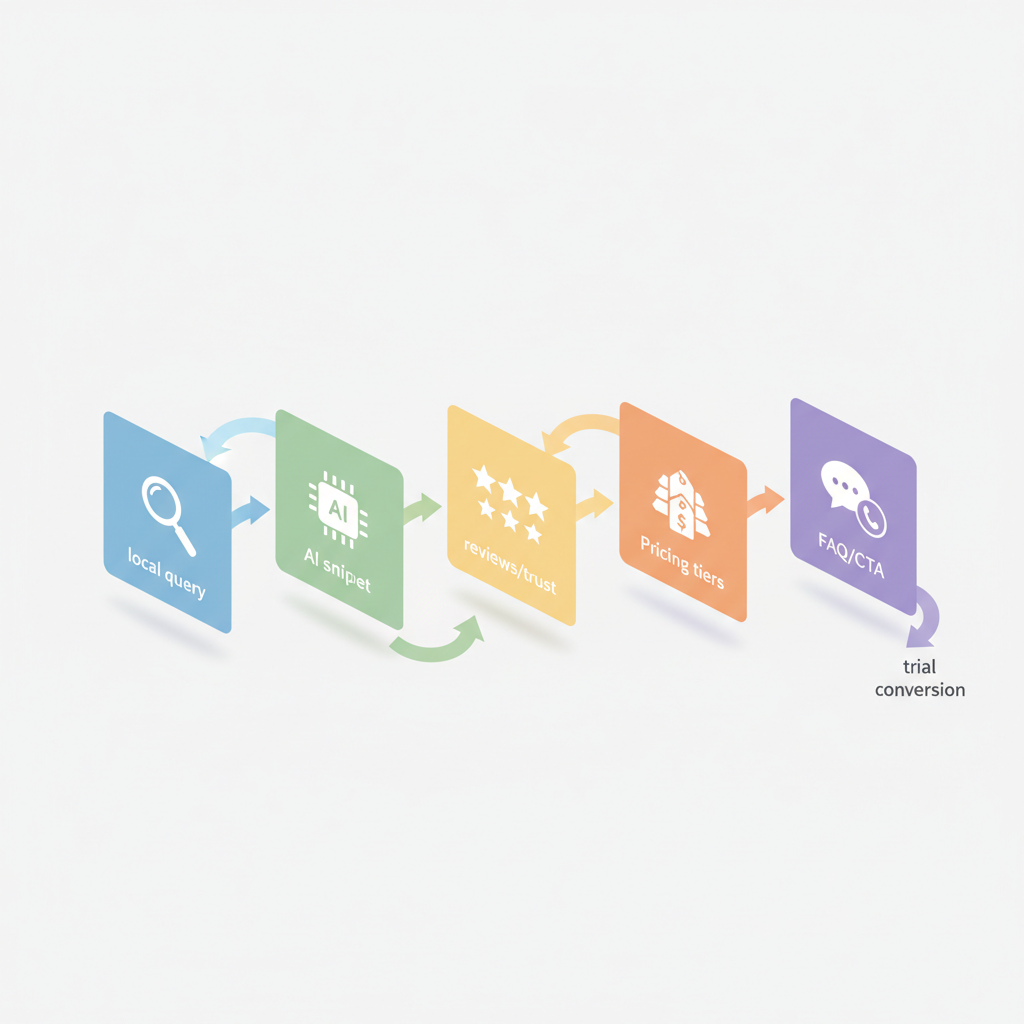
Without a predictable page structure, local pages confuse users and search systems. Use a repeatable five-section anatomy so each city page consistently answers local intent and feeds structured data. The five sections are: hero with AI snippet, trust signals, pricing summary, pre-trial FAQs, and local CTAs. Repeatable structure helps programmatic systems like SEOAgent deploy and verify pages at scale.
Section breakdown with practical guidance:
- Hero with concise AI-answer snippet: one sentence answer that includes the city name, the primary offer (trial, discount, same‑day), and one CTA. Keep it under 20 words.
- Local trust signals: excerpted review score, badges, neighborhood references, and one highlighted 2‑sentence local testimonial.
- Pricing summary: transparent, tiered, and local-discount lines with an explicit per-unit price where possible and machine-readable price schema.
- Pre-trial FAQ: programmatic Q&A blocks formatted for FAQPage schema so AI snippets can pull short, direct answers.
- Local microcopy & CTAs: click-to-call, map link, and scheduling CTA placed above the fold and repeated near pricing.
Example implementation: build a local landing page template lovable with placeholders for city_name, hours, trial_offer, and local_testimonial. Programmatically inject those fields from a CSV and validate the schema using your CMS or a CI check. For testing, target a P95 page load under 300ms for mobile to avoid search ranking friction (for typical SaaS-driven sites, aim under 200–300ms).
Hero with concise local AI-answer snippet (example copy)
The hero must answer the search in one line and show a clear action. Use this pattern: Best [service] in [city] — [offer], [quick availability]. Example: "Best haircut in Midtown — $10 trial, same‑day appointments." That exact phrase can be picked up as a featured snippet or an AI answer if the page also contains a matching H2 and structured FAQ.
Two example variants for testing (keep both under 20 words):
- "Best [service] in [city] — free trial, walk‑ins welcome today."
- "[Service] near [city neighborhood] — $5 trial, book online now."
Quotable insight: "Short local answers that include the city name win AI-answer slots."
Local trust signals: reviews, badges, and neighborhood references
Local visitors trust people from their neighborhood. List five-star snippets, industry badges, and one short neighborhood-specific quote above the fold. For example, display: "4.8 ★ — 230 reviews (Midtown customers say 'quick service and friendly staff')." Use structured review schema where your CMS supports it so search engines can extract ratingValue and reviewCount.
Include a compact trust cluster: rating, a verified badge (if available), and a stamped local testimonial. If you run city-specific promotions, add a line such as "Midtown resident discount applied at checkout" so visitors immediately see relevance.
Machine-readable review schema increases the chance reviews appear in search features and voice answers.
Pricing presentation that matches local search intent (transparent, tiered, local discounts)
Local searchers compare price quickly. Your pricing page seo lovable approach must present a short, scannable price summary near the top of the local page and then a detailed block below. Use transparent tiers, highlight the trial price, and show a local discount line when applicable. A clear price signal reduces friction for walk‑ins and trial signups.
A practical layout: price ribbon (trial price + CTA) → tiered table with features → local discount line → FAQ about billing. Example copy for the ribbon: "$9 first visit — reserve online or walk in today." Combine visible prices with PriceSpecification schema for each SKU so crawlers can read price, currency, and validityPeriod.
Include these concrete thresholds and artifacts:
- Show trial price prominently (example: "$9" or "Free first 7‑day trial").
- In the tier table, include monthly price, headline feature, and a short line about cancellation policy (e.g., "cancel anytime" where true).
- Use currency and price qualifiers in schema: priceCurrency, price, availability.
| Plan | Monthly | Best for |
|---|---|---|
| Trial | $0–$9 (city offer) | First‑time visitors |
| Standard | $29 | Regular local customers |
| Pro | $59 | Small business / multiple users |
Mention the local landing page template lovable that pre-fills pricing lines and schema to speed page creation. If you use a template, ensure the price fields are editable per city and that a validation step confirms schema is present before publishing.
Pre-trial FAQ section optimized for AI answers (programmatic FAQ pattern)
AI systems frequently extract short factual answers from FAQ blocks. Use a programmatic FAQ pattern: a set of concise questions followed by 1–2 sentence answers, and wrap them in FAQPage schema. Keep answers declarative and include city-specific facts where relevant.
Example questions and answers (format each as an independent Q/A pair on the page):
- Do you accept walk-ins in [city]? — "Yes. Walk‑ins are accepted during store hours; peak times are 11am–2pm."
- How long is the trial? — "The trial lasts seven days and includes one appointment."
- Is there a local discount? — "A neighborhood discount of 10% applies to first-time customers with a valid city ID."
Programmatic pattern: store FAQ rows in a CSV with columns: question, answer_short, answer_long, city, last_reviewed. Use a build script to inject city into the answers and to output FAQPage schema. Track which FAQ items generate impressions in GSC and prioritize rewriting those that have high impressions but low click-through rates.
Microcopy & CTAs for local visitors (phone click-to-call, map, schedule)
Microcopy determines whether a local visitor acts. Use direct CTAs: "Call now — open until 8pm", "Directions — 5 min from [landmark]", "Book trial slot". Put the primary CTA near the hero and repeat it near pricing and in the footer. Use phone links (tel:) and a visible map snippet so mobile users can tap for directions.
Key microcopy patterns and examples:
- Click-to-call: "Call Midtown store — (xxx) xxx‑xxxx" with a short promise: "No booking fee."
- Map link copy: "Directions — 0.4 miles from Central Park" (replace with the nearest landmark programmatically).
- Schedule CTA: "Reserve 15‑minute trial — slots today" with a short expectation line: "Arrive 5 minutes early."
Conversion tracking: set goals for phone calls, direction clicks, and scheduling completions by city. Export those metrics to a dashboard to measure which microcopy and CTA variants produce the best lift.
A/B test ideas for snippet copy, pricing labels, and trial CTAs
Run A/B tests with clear success criteria: phone calls per 1,000 impressions, scheduling conversions, or trial redemptions. Test one variable at a time and use at least a two-week window or 1,000 sessions per variant before deciding. Below are concrete test ideas and expected decision rules.
Test ideas:
- Snippet copy: Variant A uses "Free trial, walk‑ins welcome"; Variant B uses "$5 trial — book online". Decision rule: adopt variant that increases scheduling rate by at least 10% with p<0.05.
- Pricing labels: "First visit $9" versus "Save 50% on first visit". Decision rule: prefer label with higher immediate conversions even if AOV is slightly lower.
- Trial CTAs: test button text: "Reserve trial" vs "Claim free trial" and test placement: hero vs pricing ribbon. Decision rule: choose the placement/button that lowers time-to-conversion metric by 20%.
Run these tests programmatically on local pages. Use server-side flags to roll out winning variants to all city pages once validated. Track secondary metrics like bounce rate and time on page to ensure no downstream harm.
Templates: City-name title/meta examples and pricing schema samples
City-aware titles and metas boost local relevance. Use a template and substitute the city token at publish time. Example title templates and meta descriptions follow patterns optimized for AI answers and local packs.
Title templates (examples):
- "Best [service] in [City] — Free trial & same‑day booking"
- "[City] [service] — $9 first visit, walk‑ins welcome"
Meta description examples (keep under 160 characters):
- "[Service] in [City] — free trial for first‑time visitors. Book online or walk in. Open daily."
- "Reserve your $9 trial in [City]. Quick appointments and directions available."
Pricing schema sample (presented as guidance for your code or CMS):
{ "@context": "https://schema.org", "@type": "Service", "name": "First visit trial", "offers": { "@type": "Offer", "price": "9.00", "priceCurrency": "USD", "priceValidUntil": "2026-12-31" }
}
Remember: include the city token in the title and the first H2 for best AI-answer relevance. Quotable tactic: 'Include the city name in the concise answer and first H2 to increase AI-answer and local-pack relevance.'
How to use SEOAgent to deploy programmatic FAQ snippets and dynamic city pages (demo/signup callout)
SEOAgent can automate city page creation and programmatic FAQ injection. Typical workflow: prepare a CSV of cities and tokens, create a local landing page template lovable with placeholder fields, and then instruct SEOAgent to generate pages and output FAQPage schema for each city. Use the system to push updates or to run validation checks on schema presence and title tokens.
Step-by-step example workflow:
- Prepare CSV: columns = city, address, trial_price, hours, landmark, local_testimonial.
- Create a page template that expects those tokens and includes the hero snippet and FAQ block.
- Use SEOAgent to iterate over rows and publish draft pages into your CMS for review.
- Run a validation job that checks for schema, city token usage, and price fields before approving live publish.
- Monitor GSC impressions and call conversions by city; use those to prioritize further optimization.
Note: if your platform supports programmatic redirects or geotargeting rules, coordinate them with the SEOAgent output to avoid duplicate content. When you deploy at scale, schedule a staged rollout to 5–10 cities first and verify conversion lift before broad publishing.
Quick launch checklist to publish a local landing + pricing page in one day
Use this checklist to publish a validated local landing page in a single working day. Follow the steps in order and use the artifacts above (title/meta templates, pricing schema, FAQ pattern).
| Step | Action | Verification |
|---|---|---|
| 1 | Create city token CSV | CSV has city, address, trial_price, hours, landmark |
| 2 | Fill the local landing page template lovable | Hero, pricing ribbon, FAQ blocks populated |
| 3 | Add PriceSpecification and FAQPage schema | Schema validator passes |
| 4 | Publish as draft and test mobile load | Mobile load < 300ms (target) |
| 5 | Enable conversion tracking (calls, directions, trials) | Events fire during QA |
| 6 | Go live and capture GSC baseline by city | Impression row exists in GSC within 7 days |
Use the checklist to standardize launches. For multi-city rollouts, automate steps 1–3 and run step 4 as a spot check across cities.
Frequently asked questions
What is local landing pages & pricing for lovable? Local landing pages & pricing for lovable is a structured approach to creating city-specific pages that include concise AI-answer snippets, transparent pricing, and programmatic FAQ blocks to increase local visibility and convert walk‑ins and trials.
How does local landing pages & pricing for lovable work? It works by combining city-tokenized content, machine-readable pricing schema, short AI-friendly answers in the hero, and programmatic FAQ blocks so search engines and assistants can surface the page for local queries; conversion events (calls, directions, trials) are tracked by city to measure impact.
Quotable insight: "Machine-readable pricing and a one-line local answer are the fastest path from search to trial."
Ready to Rank Your Lovable App?
This article was automatically published using LovableSEO. Get your Lovable website ranking on Google with AI-powered SEO content.
Get Started






