
5 Plug‑and‑Play AI‑Optimized Pricing & FAQ Snippet Templates for Lovable Local Landing Pages (Copy‑Paste)
Learn about ai pricing snippet templates lovable: what it is, how it works, and the practical steps to apply it on your site.

On this page
- TL;DR
- Why template snippets improve click‑throughs and AI inclusion
- How to use these templates on Lovable (placements and best practices)
- Template 1 — 'Quick Price' one‑liner (for listing and hero section)
- Example copy + JSON‑LD Offer snippet
- Template 2 — 'Walk‑in Availability' microcopy (for header and CTA)
- Example copy + microdata example
- Template 3 — 'Trial & Demo Pricing' short answer (for pricing blocks)
- Example copy + FAQ schema pairing
- Template 4 — 'Local Offer' with service radius (for location pages)
- Example copy + LocalBusiness JSON‑LD
- Template 5 — 'FAQ snippet' optimized for AI answers (direct Q→A, 40–60 words)
- Multiple variations: store hours, booking window, accepted payments
- Implementation steps and a paste‑ready checklist
- Legal & accuracy notes: updating prices and schema maintenance
- FAQ
- What is 5 plug-and-play ai-optimized pricing & faq snippet templates for lovable local landing pages (copy-paste)?
- How does 5 plug-and-play ai-optimized pricing & faq snippet templates for lovable local landing pages (copy-paste) work?
- References
TL;DR
- Use short, structured pricing and FAQ lines to increase click-throughs and make AI answers extractable.
- These ai pricing snippet templates lovable are designed for Lovable builders and include copy + JSON‑LD you can paste.
- Keep FAQ snips 40–60 words and include a local phrase to improve local AI relevance.
- Update price fields in schema within 24 hours of a change to avoid stale AI snippets.
The examples below target site owners, marketers, and developers managing Lovable sites who want reliable, copy‑and‑paste pricing snippet templates and lovable faq snippets that both humans and AI can pull into answers. This article provides concrete templates, JSON‑LD code with placeholders, microdata examples, and a practical implementation checklist you can paste into a Lovable landing page.
Why template snippets improve click‑throughs and AI inclusion
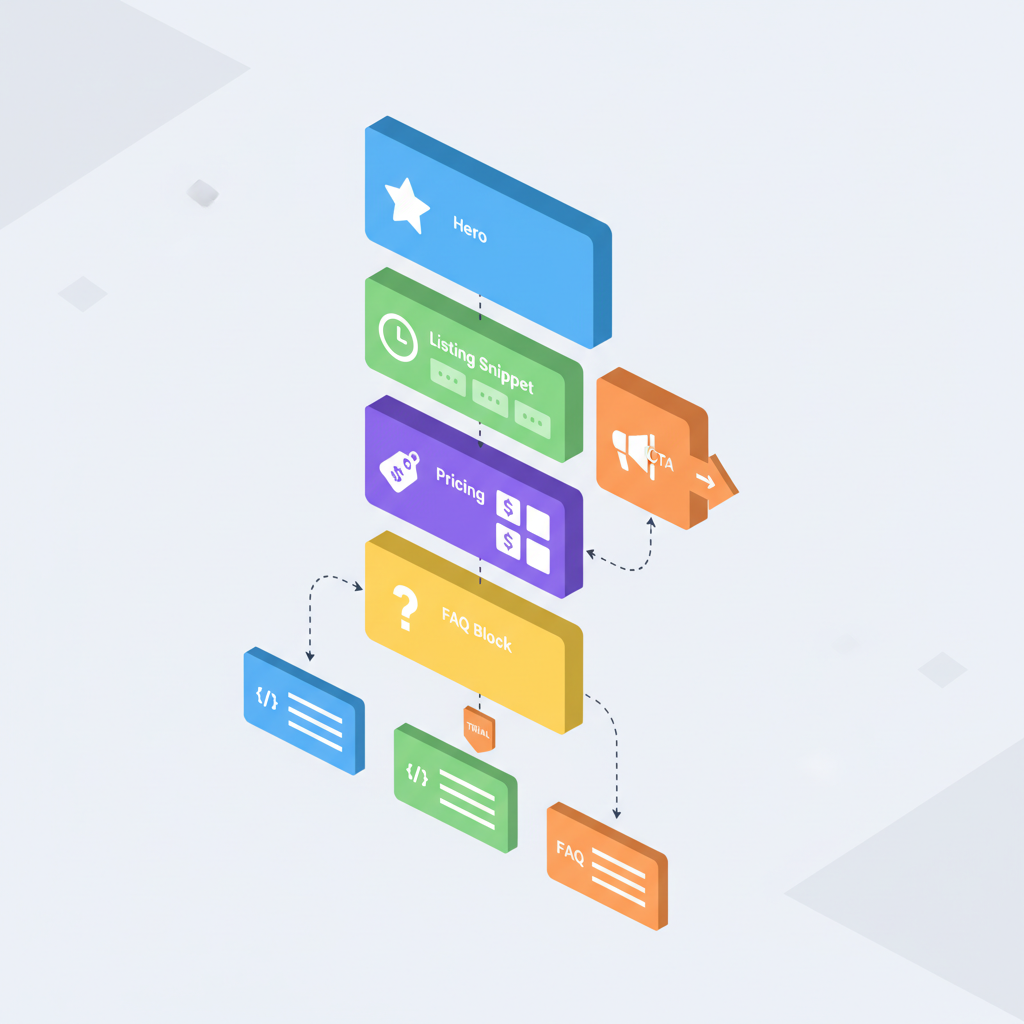
Short, specific snippet copy answers searcher intent immediately and reduces friction in search results; AI systems also prefer compact, structured facts. When a pricing line includes an amount, a time frame, and a local phrase (neighborhood or city), it becomes a concise data point that search UI and AI answer generators can extract and present as a featured snippet or quick answer. Using ai pricing snippet templates lovable ensures your Lovable landing pages feed both humans and machines the same reliable signals. For more on this, see Lovable local landing page seo.
Practical outcome: a one‑line price in a hero or listing increases perceived relevance and can lift click‑through rates by making the result feel immediately useful. For AI relevance, combine schema (Offer, LocalBusiness, FAQ) with visible microcopy—the visible line is what users click; the schema is what AI indexes.
Quotable: "Short, specific pricing lines with a local phrase increase both click-throughs and AI answer likelihood."
How to use these templates on Lovable (placements and best practices)
Place pricing snippet templates in these Lovable locations: hero section (above the fold), listing cards, pricing blocks, and location pages. Use the hero for a 'Quick Price' one‑liner, use listing cards for comparison pricing, and embed FAQ snippets below pricing or in a dedicated FAQ block to pair with FAQ schema. For Lovable sites, keep visible copy short (6–12 words) and ensure the same values appear in schema to avoid mismatches.
Best practices: 1) present a single, obvious price or range; 2) add a local phrase like the neighborhood for AI relevance; 3) make pricing machine‑readable by pairing visible copy with Offer JSON‑LD; 4) update prices immediately in both visible text and schema. These steps make your pricing snippet templates machine-friendly and human-ready.
Practical tip: If you show a range, include the unit (e.g., "from $[PRICE] per hour") and mirror that language in schema to prevent conflicting AI answers.
Template 1 — 'Quick Price' one‑liner (for listing and hero section)
"Use a single-line quick price where visitors land: short, clear, and local. The visible copy must state the service, the price, and a local phrase. Example structure: Service — Price — Local phrase. This suits hero headers and directory listings on Lovable pages and feeds quick answer UIs, as outlined in our Lovable Local SEO Playbook."
Example visible copy (6–10 words): "Standard haircut — $[PRICE] — [NEIGHBORHOOD]". Keep punctuation minimal; AI systems favor plain text. Display this in the hero and include the matching Offer JSON‑LD so both search engines and answer engines can extract the same fact.
Example copy + JSON‑LD Offer snippet
Definition: Offer schema marks a specific price or promotion for a product or service so search engines can present accurate pricing.
{ "@context": "https://schema.org", "@type": "Offer", "name": "Standard haircut", "price": "[PRICE]", "priceCurrency": "USD", "availability": "https://schema.org/InStock", "url": "[BUSINESS_WEBSITE_PAGE]", "validFrom": "2025-01-01"
}
Paste the visible copy and the JSON‑LD into the same page. Keep the Offer price updated—AI agents can ingest this directly.
Template 2 — 'Walk‑in Availability' microcopy (for header and CTA)
Use walk‑in availability copy to capture immediate intent: one short line in the header or near the CTA tells searchers whether they can show up now. Structure: Availability — Window — Local phrase. Example: "Walk‑ins welcome, 9am–3pm — [NEIGHBORHOOD]." Place this next to booking CTAs or phone links on Lovable landing pages to reduce friction.
Why it works: AI answer templates local business often surface availability lines for “can I walk in” queries; concise microcopy increases the chance of being used as a direct answer.
Example copy + microdata example
Microdata example (embed inside the header element):
<div itemscope itemtype="https://schema.org/LocalBusiness"> <span itemprop="name">[BUSINESS_NAME]</span> <span itemprop="openingHours">Mo-Fr 09:00-15:00</span> <span class="availability">Walk-ins welcome — [NEIGHBORHOOD]</span>
</div>
Keep the microcopy visible and machine-annotated so both humans and crawlers see the same availability signal.
Template 3 — 'Trial & Demo Pricing' short answer (for pricing blocks)
When offering trials or demos, use a short, direct answer that specifies length and cost. Structure: Offer type — length — price. Example: "Free 14‑day demo, $0 setup — [NEIGHBORHOOD]." This fits pricing blocks and product/service panels on Lovable pages. Pair the visible snippet with FAQ schema answering "Do you offer a demo?" for AI extraction.
Keep the line under 20 words and pair it with a precise FAQ entry to feed ai answer templates local business so conversational agents can return the demo length and cost directly.
Example copy + FAQ schema pairing
FAQ schema definition: FAQPage schema contains question→answer pairs that search engines may use for rich results and AI answers.
{ "@context": "https://schema.org", "@type": "FAQPage", "mainEntity": [{ "@type": "Question", "name": "Do you offer a free demo?", "acceptedAnswer": { "@type": "Answer", "text": "Yes — we offer a free 14-day demo for customers in [NEIGHBORHOOD]; no credit card required." } }]
}
FAQ snips should be direct Q→A, 40–60 words, and include a local phrase (city/neighborhood) to boost local AI relevance.
Template 4 — 'Local Offer' with service radius (for location pages)
Local offers should mention the service radius and any conditions. Structure: Offer — price — radius. Example visible copy: "$[PRICE] off first service within [SERVICE_RADIUS] miles of [NEIGHBORHOOD]." Place this on location pages and in sidebar blocks on Lovable sites to increase local relevance in AI answers.
Pair the visible copy with LocalBusiness JSON‑LD so AI systems see both the offer and the geographic scope. Specify the service area precisely to avoid ambiguous AI replies.
Example copy + LocalBusiness JSON‑LD
Definition: LocalBusiness schema identifies a business location and service area so local search and AI can match queries to nearby options.
{ "@context": "https://schema.org", "@type": "LocalBusiness", "name": "[BUSINESS_NAME]", "address": "[ADDRESS]", "areaServed": "[NEIGHBORHOOD]", "serviceRadius": "[SERVICE_RADIUS]"
}
Include this JSON‑LD on location pages and keep areaServed consistent with on‑page copy to avoid conflicting AI outputs.
Template 5 — 'FAQ snippet' optimized for AI answers (direct Q→A, 40–60 words)
Direct Q→A snippets perform best for conversational AI. Each answer should be 40–60 words, include a local phrase, and state the fact plainly. Example question: "What payment methods do you accept in [NEIGHBORHOOD]?" Answer: "We accept Visa, Mastercard, and Apple Pay for in‑store appointments in [NEIGHBORHOOD]; invoices by request for recurring customers."
These lovable faq snippets should be embedded in a visible FAQ block and mirrored in FAQPage JSON‑LD so AI agents can confidently extract them as authoritative answers.
Multiple variations: store hours, booking window, accepted payments
Store hours: "Open daily 9am–6pm in [NEIGHBORHOOD]; closed major holidays." Booking window: "Same‑day booking available 9am–3pm; book within business hours." Accepted payments: "Cards and contactless accepted at the counter; invoices available for recurring clients." Each line should be concise and repeated in schema to maximize the chance an AI answer cites your page verbatim.
Implementation steps and a paste‑ready checklist
Follow this checklist when adding templates to Lovable pages:
- Choose a template for hero, listing, or location page.
- Paste visible copy where users will see it (hero, pricing block, FAQ).
- Add corresponding JSON‑LD or microdata on the same page using the snippets above (Offer, LocalBusiness, FAQ).
- Verify the visible text and schema match exactly (price, neighborhood, hours).
- Test with Google Rich Results test or a schema validator and monitor search snippets.
Checklist: 1) Visible copy added, 2) JSON‑LD pasted, 3) Values matched, 4) Validated, 5) Update process defined.
Legal & accuracy notes: updating prices and schema maintenance
Keep pricing and availability consistent and auditable. Recommendation: update price fields in schema within 24 hours of any change to avoid stale AI snippets. If a price is promotional, include validFrom and validThrough in Offer JSON‑LD. Document a simple process: content owner updates the page, then runs schema validation and notes the change in an editorial log.
Quotable: "Update price fields in schema within 24 hours of a change to avoid stale AI snippets."
FAQ
What is 5 plug-and-play ai-optimized pricing & faq snippet templates for lovable local landing pages (copy-paste)?
These are ready-made short copy lines and matching schema snippets formatted for Lovable landing pages that present pricing and FAQ facts so both users and AI answer systems can extract accurate, local information.
How does 5 plug-and-play ai-optimized pricing & faq snippet templates for lovable local landing pages (copy-paste) work?
The templates work by pairing concise visible microcopy (price, availability, local phrase) with matching structured data (Offer, LocalBusiness, FAQ) so search engines and AI agents can extract consistent, authoritative answers for featured snippets and quick replies.
References
Ready to Rank Your Lovable App?
This article was automatically published using LovableSEO. Get your Lovable website ranking on Google with AI-powered SEO content.
Get Started






