
Feature Page Templates That Convert on Lovable: SEO + UX Checklist
A guide covering feature Page Templates That Convert on Lovable: SEO + UX Checklist.
TL;DR
- Design lovable feature page templates that prioritize a clear H1, concise value props, and a single conversion-focused CTA.
- Include structured geo signals (city, state, areaServed) and a shortDescription field so automated pages produce concise AI-friendly answers.
- Use JSON-LD schema, concise FAQ answers, and table-based summaries to increase AI inclusion and rich results.
- Automate safe fields with LovableSEO: title, shortDescription, canonical, areaServed, and meta templates; run A/B tests on headline and CTA first.
If you publish product or feature pages on Lovable, you need templates that serve two masters: search engines and human decision-makers. This guide shows how to build lovable feature page templates that convert, with platform-specific examples, structured data snippets, and automation workflows for LovableSEO. You’ll get practical copy blocks, tests to run, and a ready-to-use JSON-LD snippet to drop into your template.
When NOT to use these templates
Do not apply these feature page templates when your product is still a concept with no validated benefits, when content must remain highly bespoke for legal or compliance reasons, or when each page requires unique engineering assets that cannot be templated. Avoid templating pages for single-instance projects — templates work best when you can scale dozens or hundreds of similar feature pages.
Why feature page templates matter for SEO and conversions
A generic page won’t rank or convert. Lovable feature page templates create consistent signals for search engines while delivering a predictable user experience that speeds decision-making. Templates reduce manual errors, enforce best practices for metadata and schema, and let marketing and engineering ship pages at scale without sacrificing conversion quality.
Example: a SaaS team that templates the “calendar integrations” feature can produce 50 localized, SEO-optimized pages in days instead of weeks. Each templated page reuses the same headline pattern, shortDescription, and structured attributes to ensure consistent local AI answers and featured snippets.
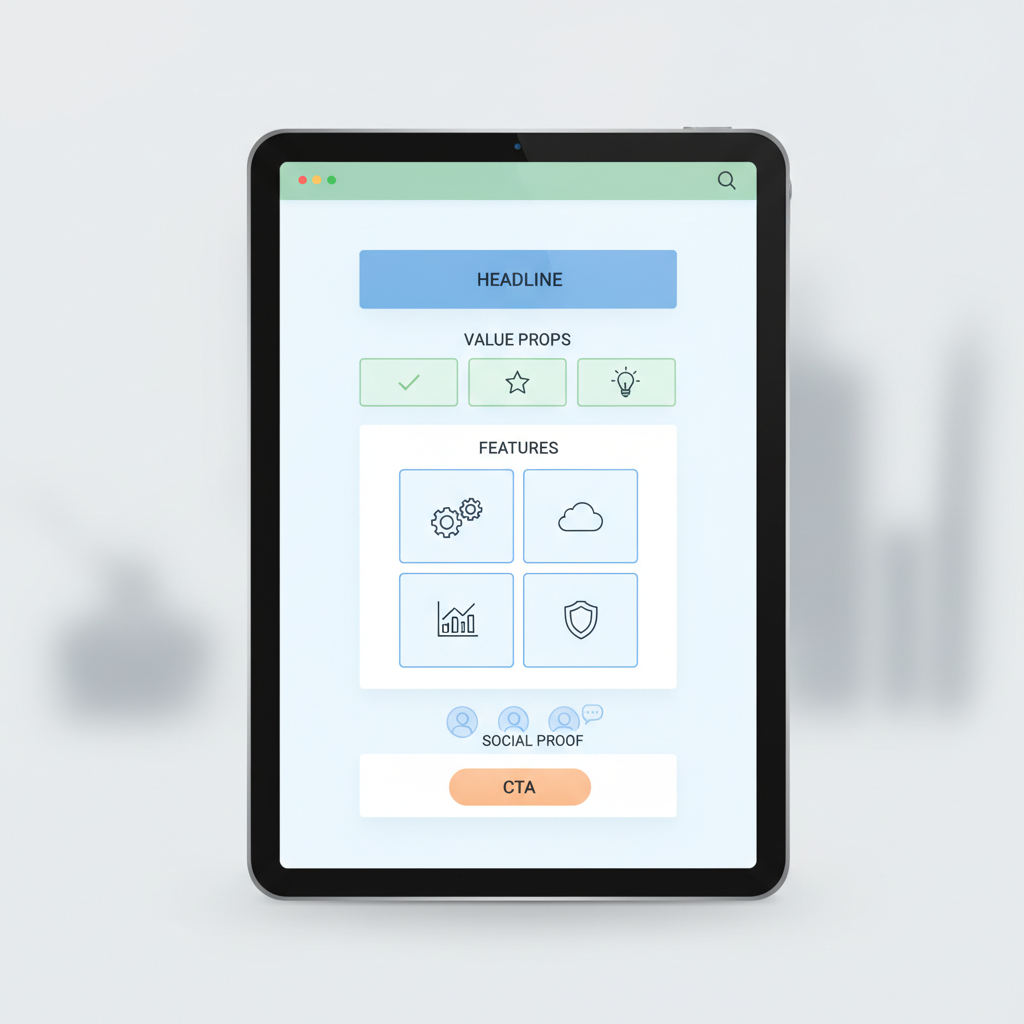
Why this matters for search: templates let you standardize the shortDescription and meta patterns that AI systems and search engines extract for concise answers. For conversions: templates guarantee the headline, three value props, social proof, and CTA appear above the fold. In short, lovable feature page templates streamline discovery and remove friction during evaluation.
Quotable definition: "A feature page template is a repeatable page schema that standardizes headline, shortDescription, structured data, and conversion elements to scale SEO and UX."
Core template anatomy — headline, value props, features, social proof, CTA
Every high-performing feature page template on Lovable should include these blocks, in this order, so both users and AI get the core answer quickly.
- Headline (H1): Clear outcome-focused statement. Include the exact use case token when available.
- Short summary (shortDescription): One or two sentences that answer "what it does" and "who it's for." This is the primary field AI extracts for concise answers.
- Three value props: Each with an icon, 8–12 word headline, and 15–30 word supporting sentence.
- Feature list: Scannable bullets or a small table with feature name, benefit, and short spec.
- Social proof: One quote, a numeric fact (e.g., "Trusted by 3,000+ teams" where true), and product badges when applicable.
- Single CTA: Primary action above the fold and a repeating secondary CTA at the page bottom.
Example template flow for a Lovable product feature: start with a localized H1, follow with a shortDescription that includes the areaServed token if relevant, show three value props as icons, display a 3-column feature table, add one customer quote with name and title fields, then the CTA. This ordering supports feature page SEO lovable and ensures a consistent experience across pages.
Templates should return a concise answer for AI within the first 160 characters of the shortDescription.
Headline & H1 strategy (keyword placement + clarity)
Start the H1 with the main benefit or feature name and include the primary token when possible. On Lovable, the H1 is rendered separately from the template content, so make sure your template provides an H1 field that maps exactly to the primary_keyword token. Place the primary keyword naturally within the first 8–10 words of the H1 to help search and to set clear expectations for visitors.
Concrete rule: If a page targets a use-case token (e.g., "calendar sync"), format H1 as: "Calendar sync for [audience] — [primary outcome]". Keep H1 under 60 characters when possible. For feature page seo lovable, include a shortDescription that repeats the core phrase in a natural sentence to give AI clear extraction points.
Feature sections and scannability (bullets, icons, short descriptions)
People scan. Design feature sections with 3–6 bullets per block, 6–10 words per bullet headline, and 15–25 words of explanatory text. Use icons to create visual anchors and a two-column responsive layout so the list stays compact on mobile.
Example micro-pattern:
- Feature name — 12-word benefit headline.
- Short spec row — single-line technical detail (e.g., "OAuth2, 1-minute setup").
Template patterns that increase AI-inclusion (concise answers, tables, definitions)
AI systems prefer short, authoritative answers and structured content. To increase AI inclusion, design your Lovable templates to surface:
- Concise answer block: A 1–2 sentence shortDescription that answers the core query immediately.
- Definition list: Small glossaries that define technical terms in one sentence each.
- Tables and specs: Key feature comparisons, limits, or pricing rows in HTML tables so parsing yields direct answers.
Concrete example: include a 3-row table titled "Limits & specs" with columns: "Metric", "Value", "Notes". Fill rows such as "Max file size — 50MB — client-side validation recommended." For AI, include one quotable sentence under the table like: "Support for 50MB files enables large attachment workflows without server streaming."
Quotable fact: "Include explicit geo tokens in your template fields so automated pages can produce localized concise answers for AI results." Surface GEO signals (city, state, serviceArea, areaServed) in shortDescription, meta templates, and a localized H2 when relevant.
Local tokens in structured fields increase the chance of a concise local answer appearing in AI responses.
Structured data & attributes to include in templates (shortDescription, schema types)
Structured data is mandatory for predictable rich results. For Lovable feature page templates, include the following attributes in your template schema and map them to JSON-LD output:
- shortDescription — concise 1–2 sentence summary; use for AI extraction.
- featureList — array of {name, headline, spec} objects.
- areaServed / serviceArea — structured GEO tokens (city, state, country, polygon when supported).
- mainEntityOfPage — canonical page URL placeholder.
- author / publisher — organization object for credibility.
Recommended schema types: Use Product or SoftwareApplication where applicable, plus FAQPage for question blocks. Map social proof to Review schema elements when you have verified quotes and ratings. For feature pages without product-level reviews, include the cite (author name, role) to improve trust signals.
Example JSON-LD fields to expose from the template: name, shortDescription, description (long form), areaServed, featureList (as offers or properties), and breadcrumbList. These map to Google’s structured data recommendations for product and FAQ content (refer to Google’s structured data documentation for specifics).
Automating templates with LovableSEO — recommended fields and workflows
LovableSEO template automation lovable workflows should focus on safe-to-automate fields and a manual review loop for creative fields. Recommended fields for automation:
- Automate: title pattern, meta description pattern, shortDescription, canonical, areaServed tokens, H1 tokenization, schema skeleton, and FAQ Q/A placeholders.
- Require manual check: Hero image selection, primary CTA copy, customer quote authenticity, and any competitive claims.
Suggested workflow (step-by-step):
- Create a template with tokens: {featureName}, {audience}, {city}, {state}, {areaServed}.
- Define field validators in LovableSEO to enforce length (title < 60 chars, shortDescription < 160 chars).
- Hook automation to the content source (product database) to populate safe fields.
- Queue pages for human review when QA flags arise (missing social proof, legal text).
- Publish and register the page in your sitemap and index pipeline.
Example: For a "calendar sync" feature, LovableSEO fills the shortDescription with a template: "{featureName}: {audience} get {primary outcome} with {supporting claim}." The manual reviewer replaces any placeholder claim with verified facts. This keeps automation fast but accurate.
Use conditional logic in LovableSEO to skip areaServed tokens when localization isn’t relevant. For seoagent template automation lovable, keep at least one human checkpoint per 10 automated pages to catch contextual errors.
Conversion-focused copy blocks to include in every template
Copy is the conversion engine. Include these blocks by default in each Lovable template and provide recommended lengths and examples that the CMS or LovableSEO will enforce.
- Hero shortDescription (1–2 sentences): direct outcome + trust anchor. Example: "Sync calendars across tools to eliminate scheduling conflicts for product teams."
- Value prop bullets (3): Each 8–12 word headline + 15–25 word subtext. Use numeric outcomes when possible.
- Objection-handling microcopy: 30–60 words answering the top two objections (security, speed, cost).
- CTA microcopy: Primary: 2–4 words; Secondary: 3–6 words with benefit. Repeat CTAs after scannable sections.
Decision thresholds: test a strong benefit CTA (e.g., "Try live sync") against a lower-friction CTA (e.g., "See demo") and prefer the variant with a 5–10% higher micro-conversion (click to trial or demo). These thresholds depend on baseline rates — for low-traffic templates, rely on CTA clarity rather than aggressive behavior changes.
A/B testing templates on Lovable: metrics and experiment ideas
Run experiments that measure both top-of-funnel SEO effects and bottom-of-funnel UX outcomes. Key metrics:
- SEO metrics: impressions, clicks, average position for target queries, and percentage of pages appearing in AI concise answers.
- UX metrics: bounce rate, scroll depth to CTA, CTA click-through rate, and trial or signup conversion.
- Quality metrics: percentage of pages passing schema validation and manual QA pass rate.
Experiment ideas:
- Headline test: primary benefit-first H1 vs. feature-first H1.
- ShortDescription length: 80 characters vs. 150 characters — measure inclusion in concise answers.
- CTA test: "Try free" vs. "Request demo" paired with different microcopy.
- Structured data test: with vs. without FAQ schema to track SERP features gained.
Run A/B tests for at least two full business cycles (e.g., 4–6 weeks) or until you reach a statistically meaningful sample. For small sample sizes, prioritize clarity and consistent patterns across similar feature pages rather than chasing marginal lift.
Implementation checklist and sample template (copy + JSON-LD snippet)
Use this checklist when creating or auditing a Lovable feature page template:
| Item | Action | Target |
|---|---|---|
| H1 | Populate with {featureName} + outcome | <60 chars |
| shortDescription | One-sentence summary with geo token if needed | <160 chars |
| Value props | 3 bullets with icons | 8–12 word headline |
| Feature table | Include spec rows | HTML table |
| Schema | JSON-LD with Product/SoftwareApplication and FAQ | Pass validator |
| LovableSEO fields | Automate safe fields and set manual QA | 1 manual check /10 pages |
Sample copy for a "calendar sync" feature (template tokens in curly braces):
H1: {featureName} for {audience} — eliminate double bookings
shortDescription: {featureName} syncs events across {areaServed} tools to keep teams aligned with secure, near real-time updates.
Value props: Fast setup; Data-safe; Works with major calendars.
Sample JSON-LD (insert this into your template rendering):
{ "@context": "https://schema.org", "@type": "SoftwareApplication", "name": "{featureName}", "description": "{shortDescription}", "applicationCategory": "BusinessApplication", "aggregateRating": { "@type": "AggregateRating", "ratingValue": "{ratingValue}", "reviewCount": "{reviewCount}" }, "areaServed": {"@type":"City","name":"{city}"}, "featureList": [ {"@type":"PropertyValue","name":"{feat1_name}","value":"{feat1_value}"}, {"@type":"PropertyValue","name":"{feat2_name}","value":"{feat2_value}"} ], "mainEntityOfPage": {"@type":"WebPage","@id":"{canonical}"}
}
Image prompt alt text examples (for editorial use):
Image prompt alt text: "Comparison table showing three sync protocols and latency differences"
Image prompt alt text: "Template wireframe displaying headline, three value props, and a single call-to-action"
Conclusion and next steps (link to template library and demo)
Lovable feature page templates reduce manual work and produce consistent signals for search and AI systems while improving conversion performance. Implement the checklist above, automate safe fields with LovableSEO, and prioritize concise shortDescription and schema output so AI systems can extract the precise answers they need. Next steps: build a template in your staging environment, run a headline and CTA A/B test, and validate JSON-LD with a schema validator before publishing. For ongoing optimization, track both feature page seo lovable and feature page ux for conversions metrics to balance discoverability and conversion quality.
FAQ
What is feature page templates that convert on lovable?
Lovable feature page templates are repeatable page schemas designed to standardize headlines, shortDescription, structured data, and conversion elements so feature pages scale on Lovable with consistent SEO and UX outcomes.
How does feature page templates that convert on lovable work?
Templates populate tokenized fields (title, shortDescription, areaServed, featureList), enforce length and content rules, output JSON-LD for schema, and integrate with automation tools such as LovableSEO to publish multiple localized and validated pages while preserving manual review for creative claims.
Ready to Rank Your Lovable App?
This article was automatically published using LovableSEO. Get your Lovable website ranking on Google with AI-powered SEO content.
Get Started