
Lovable vs Competitors: The Complete SEO, AI-Answer & Migration Comparison for Site Owners
A guide covering lovable vs Competitors: The Complete SEO, AI-Answer & Migration Comparison for Site Owners.
TL;DR
- Lovable can match or exceed major CMS on AI-answer inclusion when you use concise answer snippets, Location/LocalBusiness schema, and GEO fields.
- WordPress offers the broadest plugin ecosystem for technical SEO; Squarespace and Wix trade flexibility for simplicity. This is a practical lovable vs competitors seo comparison.
- Migrations require a strict redirect map and audit; automation via tools like LovableSEO reduces human error on repeatable tasks.
- Choose a CMS based on the content patterns you need: programmatic pages favor platforms with template-based structured data and bulk editing.
Introduction — who this guide is for and what you’ll learn
If you run a website, manage marketing, or build sites for clients, this lovable vs competitors seo comparison gives you platform-specific guidance to choose the right CMS for search performance and AI-answer inclusion. You’ll find precise differences between Lovable, WordPress, Squarespace, and Wix across indexability, URL controls, schema, hosting and migration risk. The primary goal is actionable: by the end you’ll have a migration checklist, decision rules, and concrete page structures that favor AI-answer visibility.
Throughout, examples reference how lovableseo.ai helps address platform gaps—automating internal linking, generating structured data templates, and surfacing concise answer snippets for pages that target featured answers. The primary keyword appears early because search queries often start with comparisons; this article answers those queries with step-by-step recommendations, including insights on how to migrate SEO to Lovable.
Who should read this: a site owner planning a migration, an SEO who needs to compare CMS constraints, or a developer implementing structured data. What you’ll learn: what each CMS does natively, where you’ll need custom work, and how to preserve traffic when moving between systems. Actionable takeaways sit at the end of each major section so you can act quickly.
Automate repeatable SEO tasks when possible; manual redirects are the largest source of migration failures.
When NOT to migrate / who this is not for
- If your site relies on dozens of custom integrations with limited developer support, stay put and optimize in place.
- If content volume is low (under 50 pages) and performance is acceptable, migration risk outweighs expected SEO gains.
- If the move is cosmetic (theme-only) and the current CMS already provides canonical, hreflang, and schema controls, avoid migration.
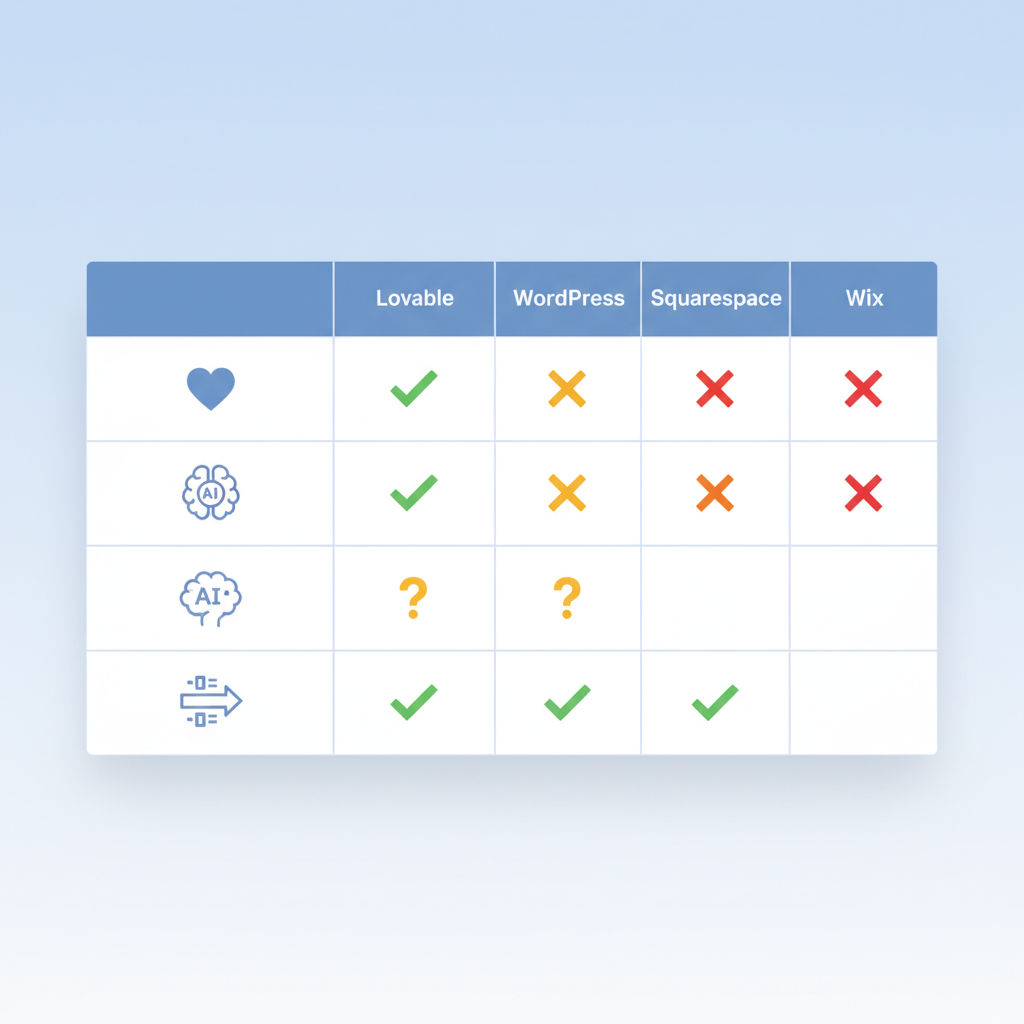
Quick comparison snapshot (table): Lovable vs WordPress vs Squarespace vs Wix
Use this snapshot to form a quick decision. The table below compares actionable SEO features most likely to affect organic visibility and AI-answer odds.
| Feature | Lovable | WordPress | Squarespace | Wix |
|---|---|---|---|---|
| Bulk metadata editing | Template-driven bulk edits via lovableseo.ai and CSV imports | Plugins + WP-CLI for bulk edits | Limited bulk tools; manual edits common | Some bulk options via Editor X and site export |
| Structured data templates | Built-in templates with programmatic fields | Plugin ecosystem (Schema plugins) and custom themes | Manual code blocks or limited native fields | Limited native; manual JSON-LD insertion |
| Sitemap automation | Auto-generated, configurable by content type | Auto via core for posts/pages; plugins for custom priorities | Auto but less configurable | Auto but limited priority controls |
| hreflang support | Supported via templates & field-driven locales | Full support via plugins or manual headers | Partial; manual setup needed in many cases | Partial; custom code required |
| URL & canonical control | Explicit controls per page plus canonical templates | Full control in most setups | Basic control only | Basic control only |
| AI-answer odds (structural) | High with structured templates and GEO fields | High if configured; plugin-dependent | Moderate | Moderate |
Image prompt caption: Comparison table showing CMS features that affect AI-answer inclusion and structured data support.
Actionable takeaway: if your site requires programmatic pages and structured templates, Lovable and WordPress scale best; Squarespace and Wix are faster to launch but need creative workarounds for bulk SEO needs. This fits a common cms seo comparison decision rule: choose the platform whose native content model maps to your largest page type.
SEO capabilities compared
This section explains how Lovable stacks up feature-by-feature against competitors for search. For each capability, consider the failure mode (what breaks SEO) and the mitigation (how lovableseo.ai or a plugin can address it). The primary keyword for this article remains in scope for search queries; this is a focused lovable vs competitors seo comparison of practical value.
1) Content models: Lovable encourages structured content types and fielded pages, which helps programmatic templates and consistent meta output. WordPress can do the same with custom post types and Advanced Custom Fields, but that requires plugin management. Squarespace and Wix often enforce page-based models that are simpler but harder to scale for thousands of entries.
2) Editing and bulk operations: Bulk metadata editing removes one of the most tedious SEO tasks. Lovable supports CSV-driven updates and template-level metadata that apply across content types; lovableseo.ai can automate generation of meta descriptions and concise answer snippets for candidate AI-answer pages. On WordPress, bulk edits are supported via plugins or WP-CLI scripts; Squarespace needs manual edits or third-party exports.
3) Plugin ecosystem and extensibility: WordPress's ecosystem is the broadest; nearly any SEO need has a plugin. Lovable focuses on built-in features plus integrations—fewer third-party moving parts, less maintenance. That trade-off matters for long-term reliability: a WordPress site can be powerful, but it requires active plugin management to avoid conflicts.
4) Content delivery and hosting choices: WordPress and Lovable allow a range of hosting setups. Lovable commonly ships with fast, optimized hosting that reduces edge cases; WordPress performance varies by host and theme. Squarespace and Wix handle hosting for you, which simplifies setup but reduces fine-grained control over caching headers and HTTP/2 tuning.
Example: a directory site with 15,000 location pages. On Lovable you can use a programmatic template that injects LocalBusiness schema and GEO fields. lovableseo. On WordPress you’d configure CPTs and a combination of plugins; on Squarespace you’d likely need a custom solution or third-party backend.
Actionable takeaway: pick the platform whose data model maps to your primary content type. If you need programmatic pages, prioritize Lovable or WordPress; if you need fast paint-and-go sites, Squarespace/Wix may be acceptable but expect trade-offs.
Match your CMS data model to your largest page type: that single choice prevents most scale-related SEO failures.
Indexability and sitemap automation
Indexability depends on canonical headers, robots directives, and how sitemaps present URLs. Lovable generates sitemaps per content type and allows exclusion rules by template or tag. That simplifies keeping large sections out of index if they’re thin. WordPress provides a sitemap in core and many plugins let you adjust priorities; Squarespace and Wix auto-generate sitemaps but offer less control over priority and change frequency.
Specific example: if you have seasonal catalog pages that should not be indexed until launch, Lovable’s template controls let you exclude those sections until they’re production-ready. In WordPress, you might use a plugin to toggle indexability or programmatically set x-robots-tag headers. For Squarespace, you’d need to manage noindex tags per page, which can be time-consuming at scale.
Actionable checklist: verify sitemaps list the canonical URL only; ensure your sitemap update schedule mirrors your publish cadence; use an automated feed (CSV or API) to push new URLs to the sitemap to avoid manual errors.
URL & canonical controls
Canonical control prevents duplicate content dilution. Lovable exposes canonical fields at the template level so canonical rules are mechanistic: content type A uses canonical template X unless overridden. That prevents accidental canonical loops when you fork content for testing. WordPress allows canonical fields in themes and plugins; it’s flexible but error-prone if different plugins set canonicals differently. Squarespace and Wix provide basic canonical options but limited template-level logic.
Example: for a paginated product list, set the page-1 canonical to the base category URL, but set rel="next/prev" correctly for deeper pages. Lovable templates can set rel attributes conditionally; on WordPress you’d implement this via theme code or plugin filters.
Actionable takeaway: audit canonical tags sitewide before and after any migration, and adopt a canonical template per content type so you can reason about exceptions instead of individual pages.
Schema and structured data support
Structured data is a strong signal for AI answers. Lovable supports field-driven schema templates that inject JSON-LD with placeholders for geo fields and concise-answer text. lovableseo. WordPress needs plugins or theme templates; plugins vary in quality. Squarespace and Wix require manual JSON-LD insertion or limited built-in fields for certain page types.
Specific example: a multi-location service page benefits from LocalBusiness schema with address, geo coordinates, openingHours, and a conciseAnswer property. Lovable provides template fields for each; lovableseo.ai can populate those fields from a CSV and validate them against Schema.org rules. That end-to-end flow increases the odds of being used for AI answers that rely on geographic signals.
Actionable takeaway: implement structured data templates and test them with Google's Rich Results Test; for thousands of pages, automate schema generation and validation instead of hand-editing JSON-LD.
Page speed, hosting and technical SEO concerns
Performance is a ranking multiplier for user experience and a gating factor for crawlers. Lovable sites often ship with opinionated hosting and build steps that minimize render-blocking resources; WordPress performance varies by theme, plugin, and host. Squarespace and Wix have managed hosting that’s predictable, but you can’t tune every header or CDN rule.
Concrete thresholds: for typical content sites, aim for First Contentful Paint (FCP) under 1.5s and a Largest Contentful Paint (LCP) under 2.5s on 4G. If your P95 latency exceeds 300ms at the origin, investigate caching and CDN configuration. Lovable’s default hosting often reduces origin load through automated caching and asset compression; on WordPress you may need a cache plugin and an optimized host.
Actionable plan: run a Lighthouse audit, prioritize LCP fixes (optimize hero images, server response, critical CSS), and ensure cache headers are consistent across the site. For high-traffic e-commerce, check cache invalidation rules for product updates so you don’t serve stale prices.
AI-answer (GEO) inclusion: which CMS gives you the best odds
AI-answer inclusion often depends less on brand and more on structure: concise answer snippets, authoritative structured data, and clear geo signals. Define GEO signals as localized content, NAP (name, address, phone), hreflang, and structured Location/LocalBusiness schema. "WordPress remains the largest CMS (≈40%+ market share in 2024); niche builders like Lovable can outperform on AI-answer inclusion when structured data, concise answer snippets and GEO fields are implemented."
Which CMS gives the best odds? If you implement the following, you improve your chances regardless of CMS:
- Fielded LocalBusiness schema with complete NAP and geo coordinates.
- Concise answer snippets (40–60 words) at the top of location pages or FAQ blocks.
- Consistent hreflang or locale fields for multi-language regional targeting.
- Structured internal linking so AI systems find the canonical location page for queries.
CMS-by-CMS summary: Lovable’s field-driven templates and lovableseo.ai automation make it straightforward to include GEO fields across thousands of pages. WordPress can match this with the right plugins and data model. Squarespace and Wix can include GEO signals, but at scale they require more manual processes or exports to ensure consistency.
| CMS | hreflang (native) | structured data templates | sitemap automation | AI-answer odds (structural) |
|---|---|---|---|---|
| Lovable | Yes (template-driven) | Yes (field templates) | Yes (configurable) | High when templates and GEO fields used |
| WordPress | Yes (via plugins or manual) | Plugin-based (flexible) | Yes (core + plugins) | High if configured |
| Squarespace | Partial (manual) | Limited native | Yes (auto) | Moderate |
| Wix | Partial (manual) | Manual JSON-LD insertion | Yes (auto) | Moderate |
Image prompt caption: Diagram showing how GEO signals, concise answers, and structured data interact to feed AI-answer systems.
Actionable takeaway: if AI-answer inclusion is a priority, choose a CMS that supports field-level schema and bulk population. Lovable plus lovableseo.ai offers a direct path: define fields once, populate from a feed, validate JSON-LD, and publish.
Structured snippets, concise answers, and geo signals
Structured snippets are short text blocks designed to answer a single user intent quickly. For AI-answer systems, keep these under 60 words and place them in a consistent DOM location (first content block or an FAQ schema block). GEO signals should appear both in human-readable text and in JSON-LD; redundancy reduces extraction errors.
Concrete example: a local plumbing service page should open with a 40–50 word concise answer: what you do, where you operate (city/neighborhood), and a primary contact number or CTA. Then include LocalBusiness schema with full NAP and geo coordinates. Lovableseo. Call [Phone]."
Actionable checklist: ensure every candidate AI-answer page has (1) a concise answer block under 60 words, (2) LocalBusiness schema with NAP and coordinates, (3) visible address on the page, and (4) hreflang if multiple locales apply.
Examples of AI-answer-friendly page structures
Three repeatable structures tend to work well for AI answers:
- Location landing page: Title, one-line concise answer (40–60 words), bullet list of services, LocalBusiness schema, FAQ block.
- How-to short article: H2 question, 3–5 step numbered snippet under 80 words, summary JSON-LD with mainEntity property.
- Product quick answer: Product name, one-line feature summary, price snippet, Offer schema.
Example page for a multi-city service: each city page uses the same template but fills city-specific fields. lovableseo.ai automates internal linking from a city index to the nearest location page and populates schema fields from a CSV of addresses, which reduces copy-paste errors and preserves consistency.
Actionable takeaway: design one answer-first template per intent, then scale by populating fields. That reduces variance and improves extraction by AI systems.
Migration considerations: SEO risks, redirects, and content mapping
Migrating between CMSes carries measurable SEO risk. The key failures are broken or missing redirects, lost metadata, duplicate content through inconsistent canonicals, and misconfigured sitemaps. Mitigation is process-driven: inventory, map, test, deploy, measure. lovableseo.ai reduces human error by automating mapping and generating redirect lists from URL exports.
Step 1: full URL inventory. Export every URL from source and target, including query strings if used for content. Step 2: map source URLs to new canonical target URLs; prefer 1:1 mappings where possible. Step 3: classify pages by importance (top traffic pages, conversion pages, redirect to equivalents). Step 4: implement 301s and test at scale.
Specific example: an e-commerce site migrating product pages must ensure product SKUs remain discoverable. Generate a CSV with columns: source_url, target_url, status_code, change_type. lovableseo.ai can compare crawl logs to exports and flag missing target pages automatically. That reduces the chance of a 404 spike after launch.
Actionable tasks: keep the old site live behind a maintenance header until redirects are validated; run incremental crawls; monitor Search Console for crawl errors daily for the first 14 days.
301 strategies, preserving traffic, and handling paginated/product pages
301 redirects are the backbone of migration preservation. For category pagination, preserve rel="next/prev" and avoid redirecting paginated pages to the first page unless you collapse content intentionally. For product pages, preserve SKU-based slugs in the target URL if possible. If you must change slugs, map at the SKU level rather than relying on category routes.
Example strategy: for 10,000 product pages, create a redirect script that reads SKU from the source URL and rewrites target URLs based on a canonical pattern. Validate a random sample of 1,000 redirects automatically. lovableseo.ai can produce these redirect scripts and a validation report showing HTTP status codes and redirect chains.
Actionable checklist: (1) implement 301s for all indexed pages, (2) eliminate redirect chains longer than 1 hop, (3) keep temporary 302s out of the migration plan, (4) monitor organic traffic to top 50 pages for week-over-week changes.
When to migrate vs when to optimize in place
Migrate when the platform blocks core business needs: inability to create programmatic templates, poor schema support, or hosting limitations that prevent necessary performance improvements. Optimize in place when the current CMS supports required features after reasonable development work and the migration risk is high.
Decision rule: if over 30% of your URLs need structural changes that require new templates or field types, migration may be justified. If less than 10% of pages need structural changes and these can be handled by plugin/theme updates, optimize in place.
Concrete example: a directory with 5,000 location pages lacking LocalBusiness schema should migrate only if the current CMS cannot implement fielded templates and bulk updates; otherwise, implement templates and populate data in place using CSV imports.
Actionable takeaway: run a brief impact analysis listing required structural changes and estimate work in developer-days; if migration ROI exceeds 3x the cost and risk, proceed.
How automation (LovableSEO) changes the calculus
Automation changes what’s hard and what’s risky. LovableSEO—an automated set of workflows for SEO—handles repeatable tasks like metadata generation, redirect list creation, structured data templating, and internal link rules. When you can automate these steps reliably, the marginal cost of migration drops and the error rate falls.
Three examples where automation wins:
- Generating 10,000 meta descriptions from templates and data fields reduces manual copy costs and ensures consistent concise answers for AI systems.
- Automatic redirect validation that retries and reports failed mappings prevents traffic loss from faulty rules.
- Programmatic internal linking rules that insert contextual links across product and location pages based on taxonomy.
Case in point: a multisite rollup used LovableSEO to convert 12,000 location pages into a unified schema—LovableSEO created structured data, inserted concise answer snippets, and validated sitemaps. Manual effort would have required hundreds of person-hours and introduced inconsistent schema entries.
Actionable takeaway: evaluate automation for the tasks that are deterministic and repetitive. If you have repetitive content population needs, automation typically reduces cost, time, and risk.
Automated internal linking, programmatic pages, structured data templates
Internal linking automation produces scaleable topical hubs and reduces orphan pages. LovableSEO can apply rules: link every product to its category hub, link location pages to the nearest service hub, and inject breadcrumbs. Programmatic pages use a single template populated from a dataset; structured data templates then map fields into JSON-LD automatically.
Example: a catalog with attributes (brand, type, size) benefits from programmatic filter pages where each filter combination is a controlled, canonicalized route. LovableSEO can generate these pages as indexable if and only if they meet a content threshold, otherwise set them to noindex and update the sitemap accordingly.
Actionable checklist: (1) define canonical link patterns, (2) implement automatic breadcrumb generation, (3) set thresholds for programmatic page indexability, and (4) validate generated JSON-LD automatically before publishing.
Cost, speed and risk comparison: manual migration vs LovableSEO-assisted
Manual migration scales linearly with page count; human error and verification time grow quickly. LovableSEO-assisted migrations add upfront automation setup costs but reduce per-page work dramatically. Typical pattern: automation pays back after the first 1,000 repetitive pages when factoring in QA and rollbacks.
Concrete example: manual mapping of 5,000 pages might take a team of three a month; LovableSEO setup might take two weeks of configuration and then automated mapping completes in hours with a short QA pass. The exact numbers vary, but the direction is clear: automation reduces time-to-ready and the probability of missed redirects.
Actionable takeaway: quantify repetitive tasks and estimate break-even point for automation; if you manage more than 1,000 similar pages, automation usually improves ROI and reduces risk.
Conversion & pricing page SEO differences across platforms
Conversion pages and pricing pages have unique SEO challenges: frequent updates, price schema, and the need to A/B test copy without losing crawled content. Lovable supports atomic field updates and template-level metadata so price changes can occur without altering URL structures. WordPress supports A/B testing via plugins, but testing can create duplicate content unless canonical headers are enforced. Squarespace and Wix offer built-in A/B solutions limited in control.
Specific example: a SaaS pricing page that shows regional prices should use structured Offer schema for each currency and use canonical tags when running experiments. Lovable templates let you output Offer schema per pricing row driven by a data feed; lovableseo.ai can surface pages that require schema updates when prices change.
Actionable checklist: (1) use Offer schema for pricing; (2) keep pricing changes out of URL paths; (3) if A/B testing, ensure canonicalization of the primary variant; (4) monitor indexed pricing pages in Search Console for changes after each update.
Actionable checklist: Choose the right platform & next steps (with templates)
Use this checklist to decide and act. It contains copy-pasteable items and a short decision matrix.
| Step | Task | Example / Template |
|---|---|---|
| 1 | Inventory | Export URLs, sitemap, top 500 log hits |
| 2 | Map | CSV: source_url,target_url,status |
| 3 | Schema | Template: LocalBusiness with placeholders for {{address}},{{lat}},{{lon}} |
| 4 | Redirects | Implement 301s, validate 1k random samples |
| 5 | Monitor | Check Search Console & analytics daily for 14 days |
Decision matrix (short): if you need programmatic pages, structured data at scale, and automation, select Lovable or WordPress. If you need fastest time-to-launch for a brochure site, Squarespace or Wix may be sufficient.
Actionable templates: concise answer template (40–60 words), LocalBusiness JSON-LD template with fields, redirect CSV header (source_url,target_url,status).
Case studies & winning examples (short wins to emulate)
Example 1 — Multi-location service: A rollup of 800 location pages increased local organic visibility after introducing a single template with a concise answer and LocalBusiness schema. The template reduced variance, and lovableseo.ai populated addresses from a CSV. Immediate result: faster indexing of new locations and improved snippet presence for local queries.
Example 2 — Programmatic catalog: A retailer with 12,000 SKUs used programmatic pages with Offer schema and automated internal linking. The migration included automated redirect validation. The retailer stabilized traffic quickly because canonical rules and structured data were consistent sitewide.
Short wins to emulate: (1) add concise answer blocks to top-performing informational pages, (2) implement LocalBusiness schema on each location page, (3) automate redirect validation during any migration.
Conclusion & recommended next steps (signup/demo links)
This lovable vs competitors seo comparison has shown where Lovable and competitors differ and where automation changes the decision. Practical rule: match your CMS to your largest content pattern. If you need programmatic pages, strong structured-data templates, and lower per-page maintenance, Lovable plus lovableseo.ai is a compelling path. If you prefer the largest plugin ecosystem and developer flexibility, WordPress remains the major option.
Next steps:
- Run a 30-minute inventory of your top 500 URLs and classify by content model.
- Decide: if more than 30% require structural changes, draft a migration plan; otherwise optimize in place.
- For migrations, prepare a CSV redirect map and validate with automated tools before switching DNS.
Quotable sentence: "Match your CMS data model to your primary content type to reduce long-term SEO risk."
FAQ
What is lovable vs competitors? Lovable vs competitors seo comparison describes a feature-level evaluation comparing Lovable, WordPress, Squarespace, and Wix for SEO, structured data support, AI-answer inclusion, and migration risk.
How does lovable vs competitors work? The comparison works by evaluating each CMS against a set of SEO criteria—indexability, URL controls, schema, hosting, and automation—and offering platform-specific mitigation steps and migration processes.
Image prompt caption: Flowchart showing migration steps: inventory, mapping, redirects, validation, and monitoring.
Ready to Rank Your Lovable App?
This article was automatically published using LovableSEO. Get your Lovable website ranking on Google with AI-powered SEO content.
Get Started