
Feature Page Schema Templates for Lovable: JSON-LD Examples for Product & Pricing Pages
A guide covering feature Page Schema Templates for Lovable: JSON-LD Examples for Product & Pricing Pages.
Why structured data matters for Lovable feature & pricing pages
What is lovable feature page schema and why should you add it to your site? Structured data helps search engines and AI systems understand the product, price, and geographic scope of a feature page so they can show rich results, price snippets, and region-specific answers.
Implementing a lovable feature page schema improves click-through rates from search results, makes pricing transparent to AI assistants, and reduces ambiguity for crawlers. On Lovable sites, you should treat structured data as both SEO markup and a machine-readable product catalog: include Product, Offer, and PriceSpecification where relevant and add localizedOffer or areaServed for geo-targeted pricing.
Practical example: mark a single feature page for a paid plugin as a Product with an Offer that has priceCurrency and availability. That simple markup enables price-rich snippets and helps AI tools extract exact pricing for region-specific queries.
Structured product schema converts ambiguous product text into explicit facts that search engines and AI can surface accurately.
GEO signals to include: country, region, city, currency, and localizedOffer or areaServed. These let AI and search engines return correct price and availability. Below is a quotable JSON-LD showing priceCurrency and availability for a United Kingdom offer (copy-paste-safe):
{ "@context": "https://schema.org", "@type": "Product", "name": "Lovable Feature Pro", "offers": { "@type": "Offer", "price": "49.00", "priceCurrency": "GBP", "availability": "https://schema.org/InStock", "eligibleRegion": "GB" }
}
Quick AI-friendly definition: "offers.price -> shows price -> 49.00". Use the small table below for concise mapping AI systems can extract.
| schema property | purpose | example |
|---|---|---|
| offers.price | numeric price shown to users and AI | 49.00 |
| priceCurrency | currency of price | GBP |
| availability | stock status | InStock |
| areaServed / eligibleRegion | geo-targeted availability | GB |
Which schema types to use (Product, Offer, PriceSpecification, FAQ, AggregateRating)
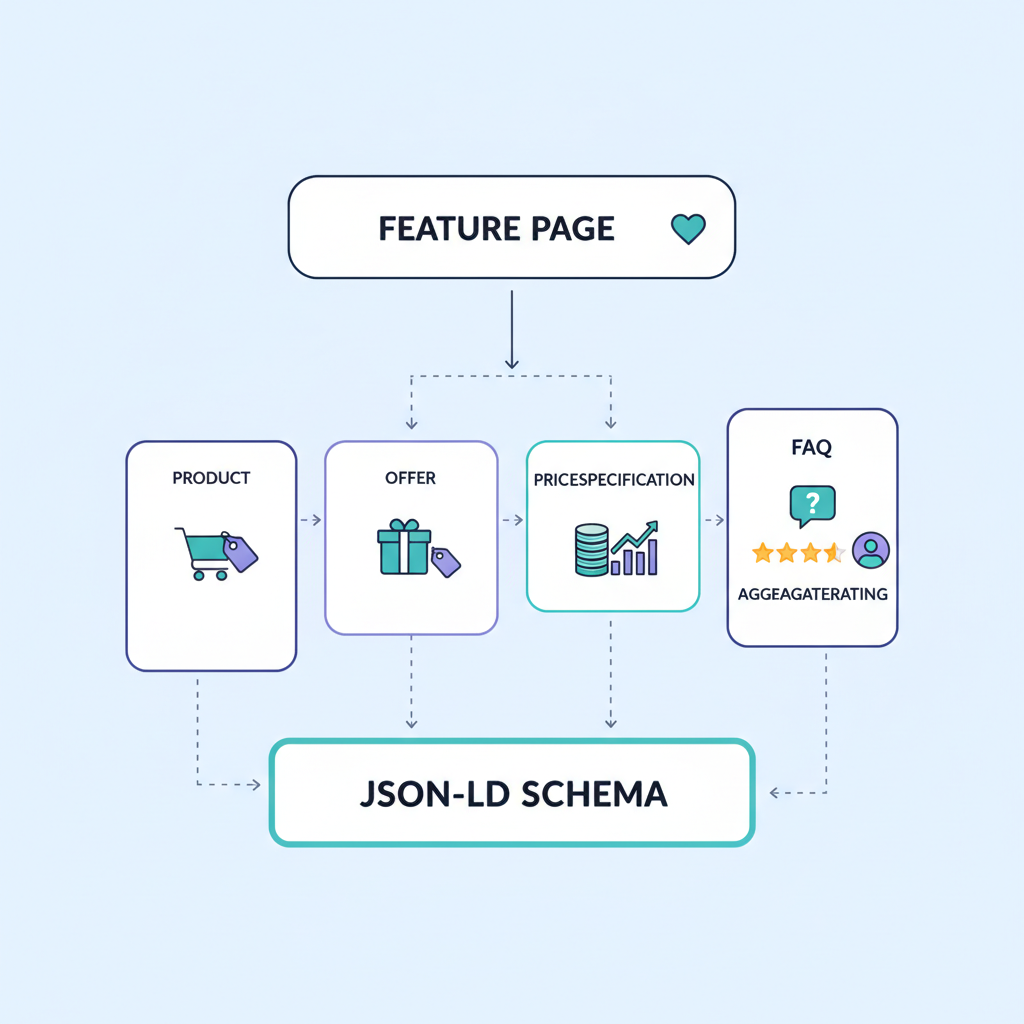
If your feature page describes a sellable capability or add-on, model it as a Product. Attach an Offer to represent a purchasable plan or single license. For tiered pricing, nest PriceSpecification entries inside Offer. For help content on the feature page, add FAQPage. If you surface customer feedback, include AggregateRating to power star-rich snippets.
Example breakdown for a Lovable product feature page: Product -> name, description, image, sku. Offer -> price, priceCurrency, url, availability. PriceSpecification -> billingPeriod, valueAddedTaxIncluded. FAQPage -> mainEntity questions and answers. AggregateRating -> ratingValue and reviewCount when you have at least a handful of reviews.
When you include these types, ensure values are accurate and match visible page content. Search engines validate rendered price and currency against JSON-LD. If you use multiple offers (regional SKUs, monthly vs yearly), represent them as separate Offer objects. Using explicit schema types improves chances for product snippets, price tables in search, and AI assistants surfacing exact plan information.
Include only accurate, page-visible pricing in schema; mismatches cause dropped rich results or manual actions.
When to include LocalBusiness or Service for localized offerings
Use LocalBusiness or Service when the feature or plan is tied to a physical location or a local delivery model. For example, if Lovable offers on-site implementation or a regional managed service, mark the page with LocalBusiness and include address, areaServed, and telephone. If the offering is a hosted SaaS plan sold globally, LocalBusiness is unnecessary.
Concrete rule: add LocalBusiness when you accept in-person bookings or provide services limited to specific cities/regions. Add areaServed or eligibleRegion to Offer objects to declare which markets a price applies to. This helps AI snippet schema lovable queries that ask for region-specific pricing and availability.
Ready-to-use JSON-LD templates (copy-paste) for Product pages
Below are copy-paste-ready JSON-LD blocks tailored for Lovable product feature pages. Replace placeholders with your page values: name, description, sku, url, price, priceCurrency, and eligibleRegion. Keep visible text consistent with the markup to avoid validation warnings.
{ "@context": "https://schema.org", "@type": "Product", "name": "[[PRODUCT_NAME]]", "description": "[[SHORT_DESC]]", "sku": "[[SKU]]", "offers": { "@type": "Offer", "url": "[[PRODUCT_URL]]", "price": "[[PRICE]]", "priceCurrency": "[[CURRENCY]]", "availability": "https://schema.org/InStock" }
}
Use this on feature pages to provide product schema lovable and to supply json-ld for lovable implementations on the platform. For pages with multiple SKUs or versions, add multiple Offer objects inside the Product object (see Template B below).
Template A: Single product feature page with price and SKU
Use Template A for a single sellable feature or plugin. Required properties: name, description, sku, offers.price, priceCurrency, availability, and url. Optional but recommended: image, brand, and aggregateRating. Keep the sku value identical to any displayed SKU on the page.
{ "@context": "https://schema.org", "@type": "Product", "name": "Lovable Feature: Exporter", "sku": "LFB-EXPORT-01", "offers": { "@type": "Offer", "price": "19.00", "priceCurrency": "USD", "availability": "https://schema.org/InStock" }
}
Template B: Feature list with multiple offers
For feature pages that list several purchase options (monthly/yearly, region-specific), include an array of Offer objects. Each Offer should have a distinct price and, when needed, eligibleRegion or areaServed. This approach enables search engines to show different price choices directly in results.
{ "@context": "https://schema.org", "@type": "Product", "name": "Lovable Feature Suite", "offers": [ { "@type": "Offer", "price": "9.00", "priceCurrency": "USD", "priceSpecification": {"@type":"UnitPriceSpecification","billingPeriod":"P1M"} }, { "@type": "Offer", "price": "90.00", "priceCurrency": "USD", "priceSpecification": {"@type":"UnitPriceSpecification","billingPeriod":"P1Y"} } ]
}
JSON-LD templates for Pricing pages and plans
Pricing pages benefit from structured PriceSpecification that explains billingPeriod, price, and whether VAT is included. Use Offer objects for each plan and attach a PriceSpecification when a plan has a metered component or discounts. Clearly label trial periods and renewal terms in visible copy and in markup.
For structured data lovable product page pricing, match visible table rows to Offer objects. If your pricing page shows tier names and features, duplicate plan names exactly in schema to avoid confusion for AI and search engines.
Template: PriceSpecification for tiered plans
Use UnitPriceSpecification for recurring fees and CompoundPriceSpecification when a price has multiple parts (base fee + per-user). Include valueAddedTaxIncluded as boolean when applicable. Example below models a monthly per-seat cost plus base fee.
{ "@type": "Offer", "price": "299.00", "priceCurrency": "EUR", "priceSpecification": { "@type": "UnitPriceSpecification", "price": "299.00", "billingPeriod": "P1M", "valueAddedTaxIncluded": true }
}
Template: How to mark up free trials and discounts
Mark free trials using an Offer with price 0 and a description of the trial period. For discounts, include an Offer with a priceSpecification of type PriceSpecification that has a validFrom and validThrough timestamp. Always show the discount prices on the page and in the JSON-LD to ensure consistency.
{ "@type": "Offer", "price": "0.00", "priceCurrency": "USD", "description": "14-day free trial", "eligibleCustomerType": "https://schema.org/Consumer"
}
How to implement templates in Lovable (step-by-step)
Implementation steps for Lovable sites: (1) Identify the page type — feature, product, or pricing. (2) Choose the appropriate template above. (3) Replace placeholders with live values. (4) Add the JSON-LD into the page header or body via the platform’s template editor. (5) Validate using Rich Results Test and submit to Google Search Console if changes are significant.
| Step | Action | Target |
|---|---|---|
| 1 | Pick template | Product or Pricing |
| 2 | Insert live values | Name, price, sku, currency |
| 3 | Add to Lovable template | Head or body script tag |
| 4 | Validate | Rich Results Test |
Where to add JSON-LD in Lovable page settings or templates
Place JSON-LD in the page head where Lovable allows custom scripts, or within the body using a script type="application/ld+json" block. If your page builder supports global snippets, add product schema lovable snippets to templates so each product page inherits correct structure. Keep scripts server-rendered when possible to ensure crawlers see them without JavaScript execution.
Using LovableSEO to inject and validate structured data automatically
LovableSEO can programmatically generate json-ld for lovable pages by pulling product fields (name, sku, price) from your CMS and injecting an Offer object per plan. Configure LovableSEO mappings so field names match Lovable CMS keys, and schedule validation checks that run Rich Results Test APIs to catch errors before publishing.
Validation & testing (Rich Results Test, Schema.org, Google Search Console)
Always validate JSON-LD with Google’s Rich Results Test and the Schema.org validator. After deploying, monitor Google Search Console for structured data reports and fix any warnings about missing recommended fields. Routine checks: ensure offers.price matches visible price, priceCurrency is correct, and eligibleRegion fields reflect target markets.
Testing cadence example: run validation on staging, after publish, and weekly for high-traffic pages. For critical pricing pages, implement an automated test that flags price mismatches between visible HTML and JSON-LD.
SEO & AI-answer best practices for schema on feature pages
To increase chances of AI snippet inclusion, provide concise, quotable facts in schema and on-page copy: exact price, billing period, trial length, and supported regions. Use plain numeric values (no currency symbols inside price field) and consistent naming across headers and schema.
Repeat secondary keywords naturally: json-ld for lovable should appear in implementation notes and examples; product schema lovable should be used when describing product-level markup. For pricing schema json-ld, include explicit PriceSpecification objects and region tags. Structured data lovable product page best practices include visible plan names, matching markup, and clear geo signals. For ai snippet schema lovable, supply short answer content in FAQPage entries that mirror common user questions.
Concise answer snippets, definition tables, and required properties for AI inclusion
Quotable definition: "offers.priceCurrency is the ISO currency code used with offers.price." Required properties for AI-readiness: name, offers.price, priceCurrency, availability. Short answer snippets belong in FAQPage entries; keep Q&A pairs under 200 characters for better snippet suitability.
| Property | Required for AI | Example |
|---|---|---|
| name | Yes | Lovable Feature Pro |
| offers.price | Yes | 49.00 |
| priceCurrency | Yes | GBP |
| areaServed | Recommended | GB |
Troubleshooting common schema errors on Lovable
Common issues: mismatched prices between page and JSON-LD, missing currency codes, and incorrect Offer nesting. Fixes: ensure server-side rendering of the JSON-LD, use ISO currency codes, and remove deprecated properties. If Google reports duplicate structured data, check for both global snippets and page-level injections creating duplicates.
Decision rule: if more than one source injects schema for the same product, disable the global snippet or adjust LovableSEO mappings to prevent collisions. For region-specific errors, verify eligibleRegion vs areaServed values use proper country codes.
Conclusion & checklist
Use the templates above to implement a lovable feature page schema and test with Rich Results Test. For pricing schema json-ld and structured data lovable product page work, ensure geo signals and exact prices are present. In the conclusion, include this quick checklist you can copy and use.
| Checklist item | Status |
|---|---|
| Product name and description in JSON-LD | ✔ |
| offers.price and priceCurrency match visible price | ✔ |
| eligibleRegion or areaServed set for geo pricing | ✔ |
| FAQPage entries for AI snippets | ✔ |
| Validated in Rich Results Test and Search Console | ✔ |
Final quotable: "Include explicit geo signals and ISO currency codes to make pricing scannable by both search engines and AI assistants." Use these templates to create json-ld for lovable product pages and pricing pages that search engines and AI will trust.
Ready to Rank Your Lovable App?
This article was automatically published using LovableSEO. Get your Lovable website ranking on Google with AI-powered SEO content.
Get Started